IwGame Engine v0.25 Released – Documentation Added

New here? What’s IwGame? IwGame is an open source free to use cross platform game engine for iPhone, iPad, Android, Bada, Playbook, Symbian, Windows Mobile, LG-TV, Windows and Mac, built on top of the Marmalade SDK. You can find out more and download the SDK from our IwGame Engine page.

Well I feel quite shell-shocked, I’ve been working flat out and its taken a few days but I finally got the first draft of the documentation done for IwGame.

The documentation consists of an 81 page document in PDF, Word and OpenOffice formats and is located in the Docs folder in the IwGame distribution. Its a first draft so please expect lots of mistakes including quite probably some quite embarrassing auto correction mistakes.

As I was producing the documentation I found a number of holes that needed to be plugged, hence an update along with the documentation:

Here are the changes for IwGame v0.250:

  • Added first draft of IwGame engine manual in PDF, Word 97 and OpenOffice formats.
  • Added CIwGame::BringSceneToFont() to allow bringing of scenes to the top of the scene stack
  • Added naming to animations in CIwGameAnim
  • Added ne findAnimation() methods to CIwGameAnimManager
  • CIwGameSound SetVolume and SetPitch() now taking floating point values
  • Added support for active and visibility to CIwGameScene scenes
  • Fixed some string comparison issues
  • Can now stop auto ad requests using CIwGameAdsView::setNewAdInterval(0)
  • Fixed issue where bad ad requests were not timing out in CIwGameAdsView

Now its time get back on with my life 🙂

Funky Cam 3D Top Downloaded App for Bada on Samsung Apps


Funky Cam 3D Icon
Funky Cam 3D Icon

Yes, you read that right, we are pretty excited to announce that our Marmalade powered Samsung Bada app Funky Cam 3D FREE has just hit the No. 1 top spot on Samsung Apps. You can a grab a copy of our No. 1 Christmas hit at Funky Cam 3D on the Samsung App Store

Funky Cam 3D is also available on the following platforms:

* iPhone and iPad

* Android (also available on most other Android stores)

You can find out more about Funky Cam 3D at http://www.funkycam3d.co.uk

If you are interested to know how many downloads that equates to per day then the value is 3000-4000 downloads per day. Just goes to show the marketing power of Samsung’s Bada platform.

IwGame Engine v0.24 Released – New Unified Ad Engine Support

Its taken a few weeks and loads of chasing people up and tests but we finally got our unified ad engine integrated into IwGame. And to celebrate that event we are releasing the code as open source. You can download the latest version of IwGame Engine from here

Here are the latest changes to IwGame:

  • Bug fix – Headers are now applied to CIwGameHttp GET requests
  • Added CIwGameHttpManager::DetermineUserAgent() to build a browser compatible user-agent
  • Added CIwGameHttpManager::DetermineIPAddress() to determine the users IP address. Please change PING_DOMAIN to your own domain!
  • Added CIwGameString::Replace(char chr, char with) char string replacment method
  • Added CIwGameString::Contains(char chr) to check if a string contains a particular char
  • Added CIwGameString::URLEncode(const char* str) to url encode an ascii string
  • Added CIwGameUtils::GetGraphicModeName(int width, int height) returns VGA style naming graphics mode
  • Added CIwGameAd – Main ad request class which requests and retrievs ads from a variety of ad providers (Inner-active and Adfonic are supported at the moment)
  • Added CIwGameAdView – Requests ads at set intervals and displays them using animations, can cache ads
  • Added CIwGameAdsViewAnimator, a basic example animator that can be used to animate ads in a CIwGameAdsView

As well as the ad request and ad view classes you will notice a few other neat additions that may prove useful such as DetermineIPAddress() and DetermineUserAgent(). DetermineUserAgent returns the IP of the device that your app is running on whilst builds a browser compatible user-agent string for all supported Marmalade platforms. Yes, I know the user-agent is fudged bit it seems to work well and its a lot more compatible with other web API’s than the default s3e user-agent header.

We decided to separate the ad request class CIwGameAds from the actual ad renderer CIwGameAdsView to enable developers to simply use one without the other, so if you just want the ability to put in an ad request feel free to just roll with CIwGameAds. if on the other hand you want the complete package that requests ads at a regular interval, displays them and handles clicks then go with CIwGameAdsView.

We have provided an example with the test bed this update that shows you how to initialise, update and shut down ads (see main.cpp). Lets take a quick look at the code that has been added:

Application ID

All ad networks need some way to identify you and your app as the originator of the ad and click requests, without them you wouldn’t get paid, so ensure that you sign up with any ad network that you are planning on usng and get your Application ID. Each ad p[rovider may call the application ID something different, such as site ID or vendor ID etc.. No matter what they call it, we call it the Application ID and it must be supplied to IW_GAME_ADS_VIEW->Init(Application_ID_String);. Note that the current example will show House Ads from inner-active even with no Application ID (this is just to show you it working).

Note that you can change your Application ID in-between requests as well as which provider you are using, this is a good way to ensure that you get a close to a 100% fill rate maximising your revenue; if one ad provider does not return an ad then request one from the next ad provider. We will add support to automate this at a later date.

Whats Changed in Our Code

Firstly we added the following headers:

#include “IwGameAdsView.h”
#include “IwGameAdsViewAnimator.h”

Then we added an initialisation function to initialise the ads system:

void AdTest_Init() { int width = IwGxGetScreenWidth(); int height = IwGxGetScreenHeight(); // Create ad view CIwGameAdsView::Create(); // Initialise with Application ID (you get this from your ad provider) IW_GAME_ADS_VIEW->Init(""); // Set ad provider IW_GAME_ADS_VIEW->setAdProvider(CIwGameAds::InnerActive); // Set ad request interval in seconds IW_GAME_ADS_VIEW->setNewAdInterval(30); // Force a request for an initial ad IW_GAME_ADS_VIEW->RequestNewAd(CIwGameAds::InnerActive); // Set total number of ads visible in the ads view IW_GAME_ADS_VIEW->setNumAdsVisible(1); // Tell animators to loop IW_GAME_ADS_VIEW->setLooped(true); // Create and attach an animator that fades the ad in over 1 second, pauses for 7 seconds and then fades the ad back out CIwGameAdsViewAnimator* anim = new CIwGameAdsViewAnimator(); anim->Init(); anim->setAdViewDataIndex(0); anim->setCanvasSize(width, height); anim->setInAnim(CIwGameAdsViewAnimator::AnimFadeIn, 1000); anim->setOutAnim(CIwGameAdsViewAnimator::AnimFadeOut, 1000); anim->setStayDuration(7000); IW_GAME_ADS_VIEW->addAnimator(0, anim); // Create and attach an animator that sweeps the ad in from the right the over 1,2 seconds, pauses for 7 seconds and then sweeps back out anim = new CIwGameAdsViewAnimator(); anim->Init(); anim->setAdViewDataIndex(0); anim->setCanvasSize(width, height); anim->setRestingPosition(0, -height / 8); anim->setInAnim(CIwGameAdsViewAnimator::AnimRightSweepIn, 1200); anim->setOutAnim(CIwGameAdsViewAnimator::AnimRightSweepOut, 1200); anim->setStayDuration(7000); IW_GAME_ADS_VIEW->addAnimator(0, anim); // Create and attach an animator that scales the ad in over 1.5 seconds, pauses for 7 seconds and then scales back out anim = new CIwGameAdsViewAnimator(); anim->Init(); anim->setAdViewDataIndex(0); anim->setCanvasSize(width, height); anim->setInAnim(CIwGameAdsViewAnimator::AnimScaleIn, 1500); anim->setOutAnim(CIwGameAdsViewAnimator::AnimScaleOut, 1500); anim->setStayDuration(7000); IW_GAME_ADS_VIEW->addAnimator(0, anim); // Create and attach an animator that rotates the ad in over 1 second, pauses for 7 seconds and then rotates back out anim = new CIwGameAdsViewAnimator(); anim->Init(); anim->setAdViewDataIndex(0); anim->setCanvasSize(width, height); anim->setInAnim(CIwGameAdsViewAnimator::AnimSpinIn, 1000); anim->setOutAnim(CIwGameAdsViewAnimator::AnimSpinOut, 1000); anim->setStayDuration(7000); IW_GAME_ADS_VIEW->addAnimator(0, anim); }

Don’t be alarmed and think OMG this is much harder than using AdMobs or iAds, most of this code is simply for setting up animations. In fact, yuo can just strip out the animation code (marked in orange) and remove it, the adw ill simply sit in the middle of the screen quite motionless.

Now lets take a look at how we update the ad system:

void AdTest_Update() { // Update the ads view IW_GAME_ADS_VIEW->Update(GAME->getCurrentScene(), 1.0f); // Draw the ads view IW_GAME_ADS_VIEW->Draw(GAME->getCurrentScene()); }

Nice and super simple. if you are wondering, the underlying rendering is taken care of by Iw2D.

And finally our Ad clean up code:

void AdTest_Release()
{
IW_GAME_ADS_VIEW->Release();
CIwGameAdsView::Destroy();
}

All nice and easy stuff. Now you can run ads across all Marmalade SDK platforms, depending on the Ad Providers support for those platforms. Thus far we have tested on iOS, Android, Blackberry Playbook and Bada and ads are delivered and clicks registered.

Hiding and Showing Ads

If you are using CIwGameAdsView to display  ads then you can call IW_GAME_ADS_VIEW->setVisible(ad_visibility) to change ad visibility. Note that, if you make the ads view invisible then it will stop requesting and updating ads.

Displaying Multiple Ads

CIwGameAdsView currently supports display of multiple cached ads simultaneously. To enable this feature simply call IW_GAME_ADS_VIEW->setNumAdsVisible(ad_count); This will tell ads view to draw the last ad_count ads that have not expired. You will need to set the screen positions, scales, rotations etc for each separate ad unit by calling setPosition(), setScale(), setAngle() etc methods of CIwGameAdsView. The first parameter is the index of the ad slot you want to change. You cam do this manually or attach animators.

Which Ad Providers Are Supported?

We’ve spent most of the last few weeks trying to integrate with ad providers network API’s, which is made more difficult than it should be because some providers are a bit lax and even unhelpful when it comes to providing integration support, some have been pretty good though, especially Inner-Active, they are very on-the-ball.

We went ahead and left all of the code in there for all providers that we have attempted to integrate this far in case any of you want to pick up on where we left off.

The current list of providers we have attempted integration with includes:

  • Inner-Active – Works incredibly well across all platforms
  • AdFonic – Works, now has full support for carrier and WiFi
  • MobFox – Ads wont deliver over WiFi or carrier, trying to fix
  • InMobi – Ads wont deliver over WiFi or carrier, trying to fix
  • Madvertise – Registering impressions but never returns any ads
  • Mojiva – Awaiting app approval before we can test, so potentially works

We plan to ad support for most of the other major Ad players, once we find details of the REST based API’s

What Information Do I Need to Supply?

You should provide at least the following minimum information to the CIwGameAds class before requesting ads:

  • Application ID

If you want more targeted ads then you can also supply other information such as:

  • Users Age
  • Users Gender
  • Users Location
  • Application Category
  • Users Mobile Number
  • Keywords associated with the user

Note that not all ad providers will use all of the above.

Marmalade are Having a Christmas Sale!

Whilst I’m not much keen on Marmalade on my toast, it certainly tastes nice when it comes to cross platform game and app development. Not only can I write code in a single language, but I can also deploy to over 10 platforms with ease, including iPhone, iPad, Android, Bada 1.0 / 2.0, Blackberry Playbook, LG-TV, Symbian, Windows Mobile, WebOS, Mobile Linux, Windows and Mac OSX!

The people behind the best cross platform native SDK (that’s the Marmalade SDK for all you inter-galactic new arrivals) are now having a Christmas license sale. All licenses are now 20% off! If you have been toying with the idea of buying a license then I suggest you get it now and save yourself 20% off the usual price, bringing the basic license down to $134 and the pro license down to $399.

Don’t forget you can also get yourself a free license by getting accepted into Marmalade’s apps program or by contributing code to the community.

So go to Marmalade’s web site and grab a license whilst prices are stupidly cheap.

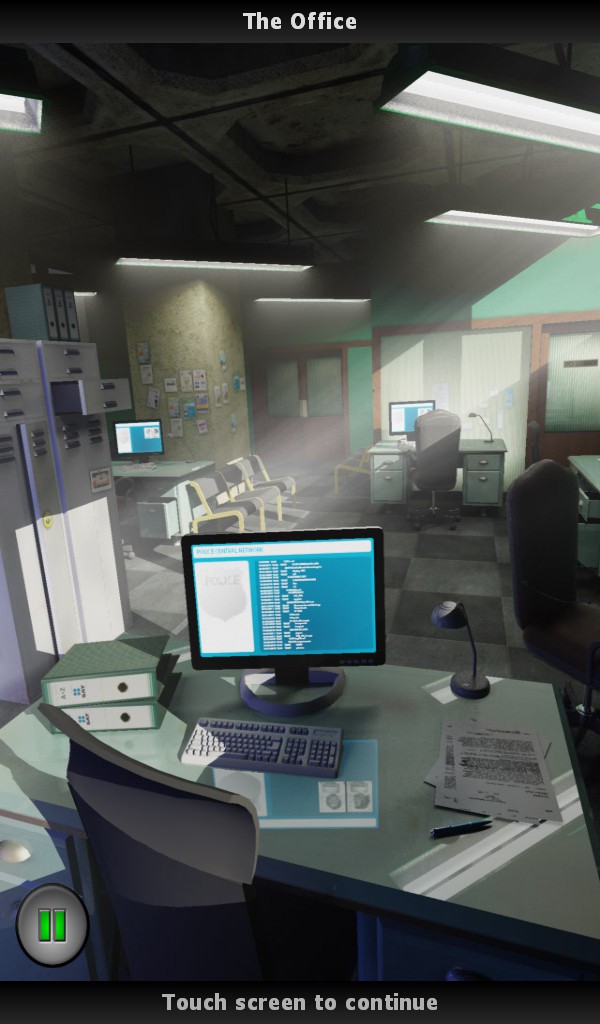
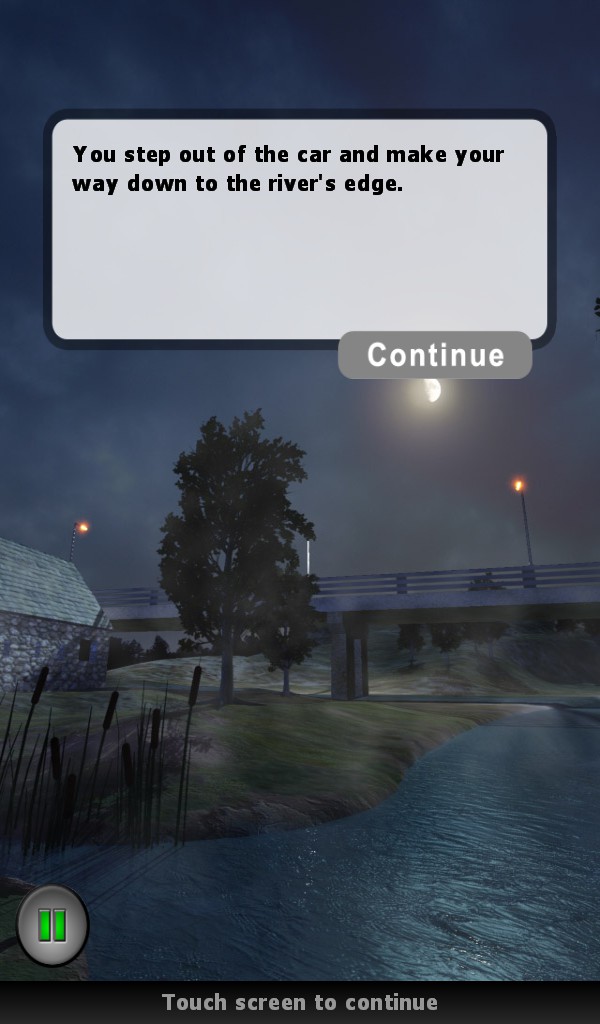
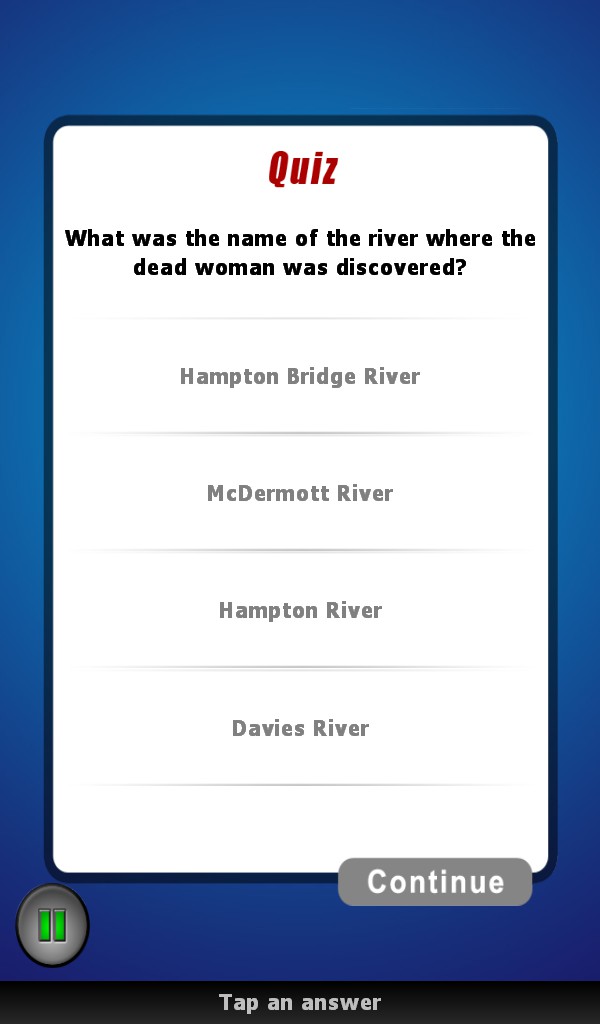
Murder Detective Hampton Bridge Murder Blackberry Playbook HD Game Out Now

Our client just released their Marmalade SDK powered HD adventure title “Murder Detective – Hampton Bridge Murder” on Blackberry Playbook, iOS and Android coming very soon.

https://appworld.blackberry.com/webstore/content/67338?lang=en

Games Description:

Murder Detective – The Hampton Bridge Murder. Join Detectives Phil McDermott and Dave Stanton as they try and solve the mystery of a woman found murdered on the banks of the Hampton River. Unravel the complex crime story and choose your path. Your choices will determine how the story ends. An interactive mystery where you control the adventure. Gather evidence, interrogate suspects, follow the clues and catch the murderer. You will be given a detective ranking at the completion of the case based on your attention to detail.

An Interactive Detective Mystery. Be Part of The Adventure. Play as Detective McDermott. Choose Your Path. Catch The Killer. Solve The Crime.

Screen Shots


Funky Cam 3D goes FREE!

Recently we looked at ways of monetising apps and games by charging nothing for them. Yes, I know it sounds ridiculous doesn’t it. Well, its not quite as ridiculous as it sounds. Its possible to make money from apps and games by either a) giving the game away for free and inserting ads in there (usually called ad-ware) and b) again, giving the game away for free but selling optional extras within the game (usually called freemium).

We recently implemented a platform agnostic API that uses the Marmalade SDK and Inner-actives M2M protocol to serve ads to all Marmalade SDK compatible phones and tablets. Currently supported platforms include iPhone, iPad, Android, Samsung Bada, Blackberry Playbook, Symbian, Windows Mobile, WebOS, PC and Mac.

The great thing about our ads is that they are different. Our ads don’t just sit at the top of the screen crying like babies for attention, instead they leap out at the user with animations and transitions, hypnotising the user into clicking on them. We like to see the process as bringing gaming to ads and not bringing ads to gaming.

We are opening up our API very soon for all Marmalade SDK developers. The ad engine will also become part of the IwGame engine with additional support for MobClix, AdWhirl and InMobi. Depending up on the API’s success we may also create bespoke versions for the iOS and Android SDK’s for those die hard developers that won’t convert to the Marmalade SDK. We will put a proper blog together  when the time comes.

Our animating ads work very well and our click rate (CTR) is proof that the pudding is cooked well. Here are a few figures:

  • Android – 3.23%
  • iPhone – 7.34%
  • iPad – 3.54%
  • Samsung Bada – 5%

Our average CTR with static AdMob ads is 1.76%

Ok, now onto the real subject, we have released Funky Cam 3D across iPhone, iPad, Android and Samsung Bada (Bada 2.0 coming soon).

Funky Cam 3D FREE can be downloaded from the following stores:

So please feel free to download Funky Cam 3D for free and check out what our animating ads look like.

Marmalade SDK 5.2 has Arrived

Well, I’m very pleased to announce that the eagerly awaited version 5.2 update to the Marmalade SDK is finally here. Some great new features have made it into the build including:

Native UI (IwNUI)

Native UI is a cross-platform UI framework that utilizes native controls. This allows developers to create user interfaces with native look and feel using a simple cross platform framework. Currently Marmalade supports Native UI on iOS and Android platforms, with IwUI used as a backend for all other platforms.

What does this mean for us cross platform phone and tablet developers? I can tell you, it means a great deal. This single addition to the SDK makes Marmalade a very viable application development platform for regular app style projects using the phones / tablets own native UI look and feel.

Bada 2 support

Support for Samsung’s bada platform is extended with this release; Marmalade can now target bada 2.0 devices.

We get a new platform, woohoo, the is the main reason why I love Marmalade so much!

iOS 5 EDK Support

iOS support has been extended to support building extensions with iOS 5.0 SDK. Extensions can now include features from iOS 5.0.

So we get access to new iOS 5.0 features via the EDK, which is great. iOS 5.0 has over 200 new features, such as the new notifications centre, iMessage, Reminders and iCloud,

Xcode Plugin Upgraded to Support Version 4.2

The Mac OS X SDK now supports Xcode 4.2 and the compiler and editor changes that were introduced with the iOS 5.0 SDK. Support for Xcode 3.x has been officially dropped. Please upgrade to the latest version. If required, Xcode 4 can be installed in parallel to any existing 3.x installation by specifying a different install location and using the xcode-select command line tool.

iOS Remote/Push Notification Support

Added full support for remote/push notifications in s3eIOSNotifications, including support for embedding provisioning profiles in development builds.

EDK Support on OS X

Extensions are now supported for Mac OS X deployments.

WebView Enhancements

s3eWebView now supports transparency and local file access.

Also included are many bug fixes and other minor enhancements and changes, too numerous to mention in fact. The full list is available in the re,lease notes on Marmalade’s web site

IwGame Engine Update – v0.230

Well its been an interesting day to say that its a Sunday, some good news and some bad new . The good news is that I managed to sneak some time in today to add a few updates to IwGame. The bad news is that some robbing (insert lots of non-religious type words here) has skimmed my card and robbed my bank account! (Can’t these people just get jobs like the rest of us!). Anyways, anger vented, now to get back on topic. We have just updated the IwGame game engine to v0.230. If you don’t know what IwGame is then in short it is a cross platform game engine for smart phones and tablets based upon the awesome Marmalade SDK. Here are the new features:

  • Added CIwGameImage::CreatePNG(int& size) to CIwGameImage to allow the creation of memory based PNG files
  • Added pngilb and zlib dependents
  • Added helper support to CIwGameInput for detecting touched, tapped events, delta change and back / menu buttons
  • Added CIwGameSprite::HitTest(int x, int y) which basically tests to see if a screen point is inside a sprite (takes into account scaling and rotation)
  • Added CIwGameAudio, CIwGameSound and CIwGameSoundCollection classed to support playback of sound effects and music
  • Added visual layers to sprites and actor system allowing sprites / actors to be depth layered
  • Added support for clipping in CIwGameScene. The scene can now be clipped to a rectangular area of virtual canvas

And here are the general changes / bug fixes:

  • Changed CIwGameFile::Open(const char* path, const char* mode, bool blocking), we now use mode instead of read / write flag
  • Added new CIwGameFile::Seek(int offset, s3eFileSeekOrigin origin) method
  • Replaced CIwGameHttpPostData::AddHeader() with CIwGameHttpPostData::SetHeader() to allow replacement of http headers
  • Added ClearRequests() and CancelRequests() to CIwGameHttpManager() allowing us to clear the request queue and cancel any in progress http requests
  • Removed two bugs from CIwGameInput, one that was stopping button / key presses and another that was preventing keyboard update if touch screen wasn’t present (doh!)
  • Added helper support to CIwGameInput for detecting touched, tapped events, delta change and back / menu buttons
  • Fixed CIwGameScene::removeActor(CIwGameActor* actor) bug (could not remove unnamed actors)
  • Fixed CwGameScene::removeActor(unsigned int name_hash) (would not deallocate pooled actors for re-use)
  • Fixed sprites initial state as invisible bug in CiwGameSprite
  • Moved Width and Height from CIwGameBitmapSprite to CIwGameprite, makes sense that all sprites would need to have a size
  • IwGame has been made into its own standalone project
  • The IwGame Testbed has now been moved to the TestBed folder

Important note, IwGame now exists as a separate project from the test bed. You now have to add IwGame to your project by adding IwGame to the subprojects section of your MKB file. The test bed is also a separate project and is located in the IwGame sub folder named TestBed. Lets take a quick look at some of the changes

Sprite Depth Layers

Its now possible to layer sprites in a sprite manager. The feature is automatic, all you have to do is set the layer of the sprite using setLayer(int layer_number). To set the number of depth layers available to the sprite manager you pass the layer count into the sprite managers Init() method. The default is set to 10 layers. As a scene contains a sprite manager to handle its contained visuals, you can also specify the number of depth layers when you initialise a scene: int Init(int max_collidables = 128, int max_layers = 10); Again, the default is 10 layers. Note that sprites on higher layers will be drawn on top of sprites on lower layers.

Creating PNG’s

You can now create an in-memory PNG file from a  CIwGameImage using CIwGameImage::CreatePNG(): uint8* png_data = image->CreatePNG(png_size); The method currently only supports images in RGB_565 and RGB_888 format. more formats will be added when I implement a new pixel conversion helper class.

CIwGameInput Expansion

I decided to pan CIwGameInput out a little adding new methods to do common tasks such as:

  • bool hasTapped() – Returns true if user tapped the screen
  • bool isTouching() – Returns true if user is currently touching the screen
  • CIwVec2 getTouchedPos() – Returns the position at which the user is touching the screen
  • CIwVec2 getDragDelta() – Returns the number of pixels the user has moved their finger / stylus since the last frame
  • bool isBackPressed() – Returns true if the back button was pressed (nice for Android)
  • bool isMenuPressed() – Returns true if the menu button was pressed (nice for Android)

These should help if you want to get up and running quickly with input.

CIwGameSprite hit testing

CIwGameSprite got a new method called hitTest() that lets you check to see if a point is inside a transformed sprite:

// Generate transformed vertices bool CIwGameSprite::HitTest(int x, int y) { // Generate transformed vertices int w = Width / 2; int h = Height / 2; TransformedV[0].x = -w; TransformedV[1].x = w; TransformedV[2].x = w; TransformedV[3].x = -w; TransformedV[0].y = -h; TransformedV[1].y = -h; TransformedV[2].y = h; TransformedV[3].y = h; for (int t = 0; t < 4; t++) TransformedV[t] = Transform.TransformVec(TransformedV[t]); int i1 = 0; int i2 = 3; for (int t = 0; t < 4; t++) { int x0 = TransformedV[i1].x - TransformedV[i2].x; int y0 = TransformedV[i1].y - TransformedV[i2].y; int x1 = x - TransformedV[i2].x; int y1 = y - TransformedV[i2].y; if ((x1 * y0 - x0 * y1) >= 0) return false; i2 = i1; i1++; } return true; }

This basically transforms the sprite by the sprites current transform and checks to see if a point falls inside the sprite (takes into account rotation and scaling). If you are curious about the method it uses dot products . If the points liles on the outside of any of the lines that make up the sprite then it cannot possibly be inside the polygon.

CIwGameAudio – Let there be Sound

Yes, that’s right IwGame just got audio. I basically built a wrapper on top of IwSound that lets you easily play sound effects located in a resource file as well as music. New classes include:

  • CIwGameAudio – This is the singleton that is responsible for creating, destroying and updating the audio system
  • CIwGameSound – This class represents an instantiates sound effect
  • CIwGameSoundCollection – This class represents a collection of sound effects

if you are using IwGame then you do not need to do anything except load a resource file that contains your sound effects and set the CIwGameAudio’s group like this:

CIwResGroup* AudioGroup = IwGetResManager()->LoadGroup("Audio.group"); IW_GAME_AUDIO->setGroup(AudioGroup);

You then play sound effects like this: IW_GAME_AUDIO->PlaySound(“explosion”); And music like this: IW_GAME_AUDIO->PlayMusic(“music.mp3”); Couldn’t get much simpler really However, if you want to set up and update the audio system yourself you will need to:

// Initialise audio system CIwGameAudio::Create(); IW_GAME_AUDIO->Init();

Then in your main loop, every frame call:

// Update audio IW_GAME_AUDIO->Update();

And finally on clean up call:

// Shut down audio IW_GAME_AUDIO->Release(); CIwGameAudio::Destroy();

CIwGameScene Scene Clipping

You can now set a rectangular area on a  per scene basis that all actors / sprites within that scene will be clipped to. Parts of sprites that fall outside the clipping region will not be drawn. To set up clipping simply call CIwGameScene::setClippingArea(int x, int y, int w, int h) where x and y are the top / left hand corner of the clipping area whilst w and h are the width and height. Note that clipping coordinates are not specified in pixels but in virtual canvas coordinates. The origin (0,0) is the centre of the screen. So if you virtual canvas is set to 480 x 320 pixels then use x = -240, y = -160, w = 480, h = 320 to clip to the full canvas, although you can just set w to 0 to disable clipping (that’s the default).

Well that’s it for this week, unfortunately I didn’t get the time to do a new Marmalade SDK tutorial but I will try and get that done mid next week. I have some free time coming up soon so I can knock lots of tutorials out. Also have some interesting news coming up soon about an SDK we just finished that pulls ads from inner-active and displays them all fancy 🙂 Compatible with all Marmalade deployment platforms.

Marmalade SDK News – Marmalade SDK 5.1.9 now available for download

A new minor update of the Marmalade SDK has been released. Here are the changes:

  • IwGx: Added [GX] DisableFBOSurface icf option to allow disabling this functionality on devices which do not or poorly support FBO surfaces.
  • Android: Fix s3eKeyboardSetInt(S3E_KEYBOARD_GET_CHAR) having incorrect behaviour after user closes soft-keyboard with back key.
  • Android: Fix for s3eWebView extension crashing in certain circumstances.

Jusr a few fixes really. The most exiting thing about this release is the version number 5.1.9, that’s the version prior to the big 5.2 update that many of us Marmaladians are eagerly awaiting 🙂

Marmalade SDK News – Tim Closs on why the Marmalade SDK is so good

Interview with Tim Closs the CTO of the cross platform smart phone and tablet SDK, Marmalade SDK at Blackberry Devcon 2011 conference. Tim mentions how the Marmalade SDK is a good choice for bringing premium content to a variety of platforms (iOS, Android, Bada, Playbook, Symbian, LG TV and more) using the same code base and programming language. Many well known developers are already on board including big game publishers such as Electronic Arts, Popcap, Konami, Activision as well as many indie developers such as ourselves.

Tim then goes on to explain how cross platform development is possible using the Marmalade SDK as well as how super easy it is to re-target a full range of different mobile and emerging technology platforms with very few changes (This we have proved from our own experience with the Marmalade SDK). He also explains how code compiled for the Marmalade SDK is “native”, which means full throttle gaming with no VM’s getting in the way.

Tim then mentions how we took our game BattleBallz Chaos from our existing platforms (iPhone, iPad, Android, Bada) straight to Blackberry Playbook within 24 hours of getting our hands on a Blackberry Playbook. (4 hours tweaking and signing, the rest of the time was spent waiting for approval from RIM).

Tim finally gives some brief information on how Marmalade SDK licensing works.

Nice work Tim and thank you for the mention!