Raspberry Pi – The $25 Computer

Want to begin raising awareness of a new computer that’s coming out very soon called the Raspberry Pi (http://www.raspberrypi.org/). It’s basically a $25 credit sized computer that plugs into a display / keyboard etc.. I like to call it mini-awesome!

The computer is reported to have better performance than the iPhone 4S. Heres the basic specs:

  • The SoC is a Broadcom BCM2835. This contains an ARM1176JZFS, with floating point, running at 700Mhz, and a Videocore 4 GPU. The GPU is capable of BluRay quality playback, using H.264 at 40MBits/s. It has a fast 3D core accessed using the supplied OpenGL ES2.0 and OpenVG libraries.
  • RAM 128MB (Model A), 256MB (Model B)
  • USB Ports: 1 (2 on Model B)
  • Video Outputs: Composite RCA, HDMI
  • Audio Outputs: 3.5 mm jack, HDMI
  • On-board Storage: SD / MMC / SDIO card slot
  • On-board Network: None (Model A) , 10/100 Ethernet (RJ45) (Model B)

And its small enough to fit in your wallet! Like I said mini-awesome

We are so impressed with this little marvel that we are considering porting the IwGame Engine over to enable hobbyist and indie developers to get games up and running quickly on the platform.

Would like to hear your thoughts on the Raspberry Pi

IwGame Engine v0.29 Released – XOML is evolving

New here? What’s IwGame? IwGame is an open source free to use cross platform game engine for iPhone, iPad, Android, Bada, Playbook, Symbian, Windows Mobile, LG-TV, Windows and Mac, built on top of the Marmalade SDK. You can find out more and download the SDK from our IwGame Engine page.

The Universe conspired against me this week, first of all landing me with a nice flu, followed directly by some horrible sickness bug that featured projectile vomiting of the likes only seen in movies such as the Exorcist! Thankfully the Universe decided to give me a break this week so an IwGame Engine update got finished.

Most of the changes this week are XOML related as this is the general direction we want to take the game engine. A good mix of XOML mark-up and solid coding should make games and media apps very quick and easy to develop.

Oh and we got a new logo for the IwGame Engine woohoo! Feel free to use the logo in any of your IwGame powered products, or if you want to link to us.

Ok, onto the list of iwGame Engine changes for v0.29:

  • New style system added to XOML. Actors and scenes can now use a style to reduce repetition
  • Actors and scenes now handle events such as OnSuspend, OnTapped, OnBeginTouch etc.. When an event fires it executes a collection of actions
  • Actions added to XOML to allow definition of collections of actions that can be executed. Many default actions are suppported such as ChangeScene, KillScene, PlayTimeline, PlaySound etc.. Custom actions can also be added toextend the system
  • CIwGame now handles touch begin touch, end touch and tapped events
  • CIwGame now has new Postdraw() method for adding in custom post draw rendering
  • Actors can now be made tappable and now handle OnTapped(), OnBeginTouch() and OnEndTouchEvents()
  • Actors have new HitTest() method that can be used to check if a point is inside the actors visual
  • XOML now supports creation of cameras
  • XOML now supports creation of variables and update of variables using actions, supports string, bool, int, float, vec2, vec3 and vec4
  • XOML files can now load other XOML files with new LoadXOML tag as well as LoadXOML action
  • Scenes now support a type field
  • CIwGameBitmapSprite now supports image transforms (flips. mirrors etc) which can be also applied to actors visuals using FlipX and FlipY attributes
  • You now change the current time of a CIwGameAnimInstance and CIwGameAnimTimeline
  • Bug Fix – Actor visibile state now works properly
  • Bug Fix – CIwGameShape::setShape() now works
  • Bug Fix – Transform is now reset after CIwGameAdsView finishes rendering
  • Bug Fix – JPEG file detection fixed, was not detecting certain types of JPEG files
  • Bug Fix – CIwGameString::FindNext() crash fixed

Quite a few changes and bug fixes. Note that someo f the bug fixes directly affected IwGameAds so an update to that API will be released shortly.

Lets take a look at the changes in more detail.

XOML Variables

XOML got variables, but why? Well, there are a number of reasons:

  • We want to be able to define values that can be read by the main code
  • We want to change these values via actions
  • When we implement the UI system we are looking to add data binding capabilities that will rely on values

You can declare a variable in XOML like this:

    <Variable Name="PlayerName" Type="string" Value="Player One" />
    <Variable Name="PlayerScore" Type="int" Value="0" />
    <Variable Name="PlayColour" Type="vec4" Value="255, 128, 64, 8" />

You can later modify the value of that variable using a SetVar action, more on this later.

Each scene contains its own variables collection and the global resource system also contains a global variables collection.

XOML Styles

XOML now supports the styling of actors and scenes using the new Style tag. XOML styles enable you to create a set of properties and values that are common across a range of objects then apply tat style the to them all. Hers a quick

example:

<Style Name="BasicActorStyle">
    <Set Property="Size" Value="60, 60" />
    <Set Property="Angle" Value="0" />
    <Set Property="SrcRect" Value="0, 0, 36, 40" />
    <Set Property="Image" Value="Sprites" />
    <Set Property="Timeline" Value="Player1Intro1" />
    <Set Property="Shape" Value="PlayerShape" />
    <Set Property="Box2dMaterial" Value="BounceyBall" />
    <Set Property="CollisionFlags" Value="1, 1, 1" />
</Style>

<TestActor Name=”Player2″ Style=”BasicActorStyle” Position=”0, -150″ />

The TestActor Player2 will be assigned all of the values in the properties defined in the style saving you a whole bunch of typing as well as making your mark-up much more readable and easier to maintain.

XOML Events And Actions

Actors and scenes now support various events that can fire off user defined actions. The following events are currently defined:

Scenes:

  • OnSuspend – Called when a scene is suspended
  • OnResume – Called when a scene is resumed

Actors:

  • OnTapped – Called when the user taps an actor
  • OnBeginTouch – Called when the user begins to touch an actor
  • OnEndTouch – Called when the user stops touching an actor

More will be added as we think of them or when requested. You can also add your own custom events youself. Check out the CIwGameActor class for a reference on how to do this.

Events wouldn’t really be much use unless we could carry out some kind of action when the event occurred. Actions are defined in XOML using the Actions tag, heres an example:

<Scene Name="GameScene3" Style="GenericSceneStyle" OnSuspend="SuspendActions">
    <Actions Name="SuspendActions">
        <Action Method="SetTimeline" Param1="SceneTransition1" />
        <Action Method="PlaySound" Param1="explosion" />
    </Actions>
</Scene>

You actually create a group of actions that are all executed when the action is called by an event.

The following actions are currently supported:

  • ChangeScene – Changes the currently focused scene to the specified scene
  • SuspendScene – Suspends the specified sceme
  • ResumeScene– Resumes the specified sceme
  • HideScene– Hides the specified sceme
  • ShowScene– Shows the specified sceme
  • ActivateScene – Activates the specified sceme
  • DeactivateScene – Deactivates the specified sceme
  • KillScene – Destroys and removes the specified sceme from the game, all contained resources amd actors will be also be destroyed
  • HideActor – Hides the specified actor
  • ShowActor – Shows the specified actor
  • ActivateActor – Activates the specified actor
  • DeactivateActor – Deactivates the specified actor
  • KillActor – Kills and removes the specified actor
  • PlayTimeline – Plays the specified timeline. If no timeline is supplied then the current actor / scenes timeline will be restarted (depends on where the action was defined)
  • StopTimeline – Stops the specified timeline. If no timeline is supplied then the current timeline will be stopped. (depends on where the action was defined)
  • SetTimeline – Changes to the specified timeline. If no timeline is supplied then the current timeline will changed and restarted. (depends on where the action was defined)
  • PlaySound – Starts playing a sound effect
  • PlayMusic – Starts the playing specified music file
  • StopMusic – Stops the music player playing
  • LoadXOML – Loads a XOML file into scene or globally. If a scene is provided then the XOML will be loaded into that scene
  • SetVar – Sets the value of a variable

Again, more will be added as we think of them or when requested. You can also add your own custom actions youself. Check out the CIwGameXomlAction_Actors class for a reference on how to do this.

Coupled together the events and actions system provide a very powerful way of creating fully interactive content without having to write a single line of code.

Loading Other XOML Files

It is now possible to load other XOML files from a XOML file using the new LoadXOML tag. Heres an example:

<LoadXOML File="Common.xml" />
<LoadXOML File="Sceme2.xml" />
<LoadXOML File="Scene3.xml" />

You can also (as shown in the actions section) load a XOML file from an action.

Using this system you can create fully interactive navigation based content. Think adventure games, books, magazines and informational apps etc..

Scene Cameras

Cameras can now be defined in XOML and attached to scenes. You can also switch a scenes camera using the animation system.

Image Transforms for Sprites and Actors

Sprites and actors can now use an image transform allowing you to flip the source image used to render the object. The ne FlipX and FlipY attributes are now available in XOML.

Well thats it for this update. IwGame now has some very cool features that should hopefully make game / app development much easier and quicker for everyone.

We are going to assess the possibility of wrapping up Marmalades cool UI system with XOML very soon, will keep you all posted on how that goes. I am also looking at producing a new article on in-app purchasing with the Marmalade SDK, which will form the basis of in-app purchasing for the IwGame engine.

IwGameAds SDK – Free Open Source Cross Platform Ad Engine for Mobile Games and Apps

We’ve received a fair few requests to extract the ad engine from the IwGame engine so that it can be easily used in existing products or products that do not want the fully fledged game engine. So we decided to go ahead and create a new API that supports just the ad engine. Its new home is at http://www.drmop.com/index.php/iwgameads-sdk/ and its now called the IwGameAds SDK. The SDK currently has support for 12 ad providers including:

  • Inner-active
  • AdFonic
  • Vserv – Also provides support for InMobi, BuzzCity, JumpTap, ZestAdz / Komli Mobile and Inner-active
  • Mojiva
  • Millennial Media – Also provides support for AdMob, Amobee, JumpTap and Mojiva
  • AdModa

Features include:

  • Native and cross platform
  • Free and open source
  • Fully documented
  • Support for multiple platforms (iPhone, iPad, iPod, Android, Bada, Playbook, Symbian, WebOS, Windows Mobile, Mobile Linux, LG-TV, Windows and Mac OS)
  • Asynchronously request text, image and html based ads from a variety of ad providers
  • Automatic extraction of ad data, such as image url, click url and text
  • Provision for targeted ads by age, gender, location etc..
  • Integrated ads view that can display animating ads to the user as well as detect clicks and launch the external URL / app that deals with the click destination
  • Cache and display multiple ads from multiple providers
  • Eye catching animating ads system that is currently generating 3%-8% CTR
  • Ad mediation using the priority based IwGameAdsMediator class
  • Very simple to install, set-up and use

We have not removed the ad API from the IwGame engine, this is just an additional SDK for those that want to use the ad API away from the game engine.

IwGame Engine v0.281 Released – Box2D Fixes

We found a couple of mistakes in the Box2D integration in  IwGame 0.28, so here is the fixed version, changes include:

  • Actor / scene Box2D implementation switched from multi-inheritence to composition
  • Bug Fix – Fixed issue with incorrect actor orientation when placed under Box2D control
  • bug Fix – Values for velocity, angular velocity etc were not being applied in XOML

You shouldn’t need to change any of your game code with this update.

IwGame Engine v0.28 Released – Box2D Physics Integration has Arrived

New here? What’s IwGame? IwGame is an open source free to use cross platform game engine for iPhone, iPad, Android, Bada, Playbook, Symbian, Windows Mobile, LG-TV, Windows and Mac, built on top of the Marmalade SDK. You can find out more and download the SDK from our IwGame Engine page.

IwGame Game Engine Update

The magical elves of Pocketeers Land have been incredibly busy hammering out the latest update to the IwGame game engine and here it is. We’ve had a lot of requests for Box2D integration so we shunted it in there and managed to integrate it into the XOML mark-up language as well.

Here’s the list of changes for IwGame 0.28:

  • Image, resource group and timeline managers have been collapsed into a single resource manager. All calls to scene and global resource managers should go through getResourceManager()
  • All resource types can now be marked as managed
  • New Box2D IwGame classes added
  • Box2D integrated into the scene, actor system as well as XOML. Box2D can be disabled by undefining IW_GAME_BOX2D in IwGameBox2d.h
  • New shape system added IwGameShapes that allows you to define box, circle and polygon shapes, also available in XOML
  • XOML tag names and attrbutes are now case insensitive
  • Scenes XOML now supports Gravity and WorldScale
  • Actor XOML now supports new tags Box2dMaterial, Shape, COM (centre of mass), Sensor and CollisionFlags
  • Timelines can now be shared across different actors and scenes without them playing back too fast and not updating properly
  • CIwGameActor now has a new mthod removeVisual() which removes the actors visual from the scenes visual sprite manager
  • ToLower() and ToLower() methods added to CiwGameXml. These methods will convert all tag name and attribute names to lower or upper case (values are left untouched)

Yes, we did go ahead and remove all of the different types of managers and rolled them into a single resource manager. We also got rid of case sensitivity for tag and attribute names, which should save many of you the pain of tracking down case issues when writing XOML. I for one welcome the change 🙂

I was playing with time lines yesterday and discovered that if I attached the same one to more than one object, it got updated multiple times during a single frame, which causes the animationto play back too fast. A fix has now been added for that, so time lines can now be re-used across multiple actors and scene.

Now on to the meatier changes

Box2D Integration in Detail

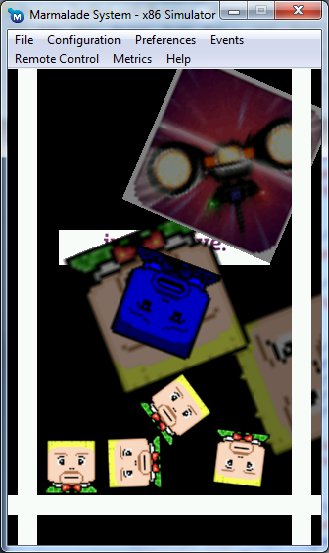
Ok, so Box2D integration requests approached critical mass so we went ahead and integrated Box2D into the engine and the XOML system. The tst bed now shows anew scene (GameScene3) which has a solid floor, 2 walls and a bunch of actors that are dropped into the scenes. As you can see from the tst bed the physics is working pretty well. Lets take a quick look at the Game3Scene in XOML:

<Scene Name="GameScene3" CanvasSize="320, 480" FixAspect="true" LockWidth="false" Colour="255, 255, 255, 255" AllowSuspend="false"> <Box2DMaterial Name="Solid" Type="static" Density="1.0" Friction="1.0" Restitution="0.1" /> <Box2DMaterial Name="BounceyBall" Type="dynamic" Density="1.0" Friction="0.9" Restitution="0.6" /> <Shape Name="PlayerShape" Type="box" width="60" height="60" /> <Shape Name="Wall" Type="box" width="20" height="320" /> <Shape Name="Floor" Type="box" width="320" height="20" /> <Timeline Name="Player1Intro1" AutoPlay="true"> <Animation Anim="PlayerImageAnim" Target="SrcRect" Repeat="0" StartAtTime="1"/> </Timeline> <TestActor Name="Floor" Position="0, 200" Size="320, 20" Angle="0" SrcRect="0, 0, 32, 32" Image="Block" Shape="Floor" Box2dMaterial="Solid" CollisionFlags="1, 1, 1" /> <TestActor Name="LeftWall" Position="-140, 0" Size="20, 480" Angle="0" SrcRect="0, 0, 32, 32" Image="Block" Shape="Wall" Box2dMaterial="Solid" CollisionFlags="1, 1, 1" /> <TestActor Name="RightWall" Position="140, 0" Size="20, 480" Angle="0" SrcRect="0, 0, 32, 32" Image="Block" Shape="Wall" Box2dMaterial="Solid" CollisionFlags="1, 1, 1" /> <TestActor Name="Player1" Position="-50, -200" Size="60, 60" Angle="0" SrcRect="0, 0, 36, 40" Image="Sprites" Timeline="Player1Intro1" Shape="PlayerShape" Box2dMaterial="BounceyBall" CollisionFlags="1, 1, 1" /> <TestActor Name="Player2" Position="0, -150" Size="60, 60" Angle="0" SrcRect="0, 0, 36, 40" Image="Sprites" Timeline="Player1Intro1" Shape="PlayerShape" Box2dMaterial="BounceyBall" CollisionFlags="1, 1, 1" /> <TestActor Name="Player3" Position="50, -200" Size="60, 60" Angle="0" SrcRect="0, 0, 36, 40" Image="Sprites" Timeline="Player1Intro1" Shape="PlayerShape" Box2dMaterial="BounceyBall" CollisionFlags="1, 1, 1" /> <TestActor Name="Player4" Position="0, -1000" Size="60, 60" Angle="0" SrcRect="0, 0, 36, 40" Image="Sprites" Timeline="Player1Intro1" Shape="PlayerShape" Box2dMaterial="BounceyBall" CollisionFlags="1, 1, 1" /> </Scene>

In the above XOML scene we declare two materials, one for our solid environment pieces (floor and walls) and then another for our bouncy players.

Next we define a shape for our player, a shape for our floor and s shape for our walls.

Lastly, we create actors that represent our floor, left wall, right wall and 4 player actors, assigning the correct shapes and materials.

The above creates a scene with animating interactive physics objects

Box2D integration will be expanded in future updates to more features to IwGame and XOML.

If you want to learn more about the internals of the Box2D integration then take a look at the IwGameBox2D source files.

Shapes in XOML

You now create shapes in code or by using XOML mark-up. Take a look at the new shape classes in IwGameShapes.h. Below is an example showing a few shapes defined in XOML:

<Shape Name="PlayerShape" Type="box" width="60" height="60" /> <Shape Name="AlineShapel" Type="circle" radius="20" /> <Shape Name="Platform1" Type="polygon"> <Point Value="-100, -100" /> <Point Value="-100, -200" /> <Point Value="100, -100" /> <Point Value="100, 100" /> <Point Value="-100, 100" /> </Shape>

Shapes can be used to define physical collision boundaries for the integrated physics system. Eventually IwGame’s new path system will utilise shapes (when its implemented)

New Resource System

The new resource system now handles all resources of any type, so all the old separate resource managers have gone. To ensure that developers do not have to be too careful with naming resources, different resources can share the same name. However, this does mean that when you ask for a resource you do need to specify its type. Here’s a few examples:

CIwGameImage* image = (CIwGameImage*)IW_GAME_GLOBAL_RESOURCES->getResourceManager()->findResource(“Sprites”, “Image”);
CIwGameAnim* animation = (CIwGameAnim*)IW_GAME_GLOBAL_RESOURCES->getResourceManager()->findResource(“PlayerImageAnim”, “Animation”);

Note that the 2nd parameter specifies the type of resource, in this case it is an Image and an Animation.

Valid type names are as follows:

  • Game – Game objects
  • Scene – Scene objects
  • Image – Image objects
  • Timeline – Animation timeline objects
  • ResourceGroup – Resource group objects
  • Animation – Animation objects
  • Shape – Shape objects
  • Box2dMaterial – Box2D material objects

This does not include any of your own custom types that you add to the system yourself.

Well, that’s it for this update. We are very likely moving onto creating the editor to accompany the engine as our next task so IwGame engine updates may come a little slower.

IwGame Engine v0.27 Released – Powerful Animation and XOML Support

New here? What’s IwGame? IwGame is an open source free to use cross platform game engine for iPhone, iPad, Android, Bada, Playbook, Symbian, Windows Mobile, LG-TV, Windows and Mac, built on top of the Marmalade SDK. You can find out more and download the SDK from our IwGame Engine page.

After much bashing with hammers and sawing with saws IwGame version 0.27 is now available for download, including updated documentation. Some of you may get a little upset as we have completely replaced the old animation system with a brand new more powerful system. Sorry for that, but thought better to change it sooner rather than later.

Lets take a quick look at the changed for v0.27:

  • Added new customisable mark-up language XOML that allows you to declare most IwGame obects declaratively, including scenes, custom actors, images, resource groups, animations, animation timelines
  • CIwGameAnimManager has been removed and replaced with the much more powerful CIwGameAnimTimeline, paving the way for very powerful actor and scene animations
  • Animation system has been completely changed to use a proper key frame interpolation system
  • Support for animation targets to automate update of object properties
  • CIwGameActorImage initialisation no longer requires a scene or an animtion. CIwGameActorImage initial image source rectangle now matches the initial size of the actor
  • setCollisionSize() added to CIwGameActor to allow setting of collision size from a radius
  • CIwGameDataInput and CIwGameDataOutput stream classes added
  • Simple, fast pooled memory XML parser added (CIwGameXml)
  • CIwGameResourceGroup system added to encapsulate Marmalade resource groups
  • Global and scene local resoure systems added
  • CIwGameImage can now be instantiated 3 ways, from memory buffer, from file or from web file
  • CiwGameImage initialisation from memory buffer no longer requires specification of the is_jpeg flag
  • Blocking parameter can now be passed to CIwGameImage::Load()
  • CIwGameScene scenes can now be assigned a colour. All contained actors will be scaled by the colour, allowing flash and fade effects
  • CIwGameBitmapSprite::setSrcRect() now takes a CIwRect
  • FRAME_SPEED_LOCK_MS now added to set frame rate cap
  • CIwGame::Init() changed to CIwGame::Init(bool enable_http), passing true will boot up the HTTP manager and allow you to use it in-game
  • Bug Fix – CIwGameHttp crashed if a request came back after the object was shut down
  • Bug fix – CIwGameActor::setCollisionRect() bug fixed
  • Bug fix – All actors were being treated as though they were collidable
  • Bug fix – Sprites no lnoger try to render themselves if their associated image is not yet loaded

Yes, I know that’s a lot of changes! Lets take a look at some of these new changes in more depth

What’s this new XOML Mark-up Language stuff all about?

Ok, time for the old copy and past. After working two days flat on updating documentation I feel less obliged to write fresh content 🙂

I like to make code that is extensible but I also like to make life easier for myself without sacrificing too much versatility, so my coding style constantly strives towards balancing ease of use and extensibility. I’ve done a lot of Silverlight / WPF coding in the past which is where I came across Microsoft’s XAML mark-up language. I later came across Adobe Flex’s MXML mark-up language and decided that mark-up language was the way to go with game and app development. Being able to define my whole UI, game scenes, animations and even game logic using simple readable XML seemed like the best way to go.

IwGame adds some of the great functionality found in XAML / MXML allowing you to declare much of what will appear in your game using XOML (XML Object Modelling Language).

The major advantages of using XOL include:

  • Saves a whole bunch of typing
  • Design and layout scenes and actors using mark-up
  • Design resource groups and images using mark-up
  • Design complex animations and time line animations
  • No recompiling required to test changes
  • Add new content without resubmitting to the app stores
  • Add content that is streamed from a server

As you can see, we have some pretty neat advantages to switching over to using a mark-up language

Lets take a quick look at an example XOML file:

<?xml version="1.0"?> <xml> <ResourceGroup Name="Audio" GroupFile="Audio.group" Preload="true" /> <ResourceGroup Name="Level1" GroupFile="Level1.group" Preload="true" /> <Image Name="Sprites" Location="Level1" Preload="true" /> <Image Name="Buddy" Location="http://www.battleballz.com/bb_icon.gif" Preload="true" Blocking="false" /> <Animation Name="PlayerImageAnim" Type="rect" Duration="0.8" > <Frame Value="0, 0, 36, 40" Time="0.0" /> <Frame Value="0, 40, 36, 40" Time="0.1" /> <Frame Value="0, 80, 36, 40" Time="0.2" /> <Frame Value="0, 120, 36, 40" Time="0.3" /> <Frame Value="0, 160, 36, 40" Time="0.4" /> <Frame Value="0, 200, 36, 40" Time="0.5" /> <Frame Value="0, 240, 36, 40" Time="0.6" /> <Frame Value="0, 280, 36, 40" Time="0.7" /> </Animation> <Animation Name="SpinAnim1" Type="float" Duration="8" > <Frame Value="0" Time="0.0" /> <Frame Value="90" Time="2.0" /> <Frame Value="180" Time="4.0" /> <Frame Value="270" Time="6.0" /> <Frame Value="360" Time="8.0" /> </Animation> <Animation Name="ScaleAnim1" Type="float" Duration="4" > <Frame Value="0.1" Time="0.0" /> <Frame Value="1.0" Time="1.0" /> <Frame Value="1.5" Time="2.0" /> <Frame Value="1.6" Time="3.0" /> <Frame Value="1.65" Time="4.0" /> </Animation> <Animation Name="ColourAnim1" Type="vec4" Duration="4" > <Frame Value="255, 255, 255, 0" Time="0.0" /> <Frame Value="255, 255, 255, 200" Time="1.0" /> <Frame Value="255, 255, 255, 255" Time="2.0" /> <Frame Value="255, 255, 255, 200" Time="3.0" /> <Frame Value="255, 255, 255, 0" Time="4.0" /> </Animation> <Animation Name="PlayerStates" Type="string"> <Frame Value="State1" Time="0" /> <Frame Value="State2" Time="0.5" /> <Frame Value="State3" Time="1.0" /> <Frame Value="State4" Time="1.5" /> </Animation> <Timeline Name="Scene1Anim" AutoPlay="true"> <Animation Anim="SpinAnim1" Target="Angle" Repeat="1" StartAtTime="0"/> <Animation Anim="ScaleAnim1" Target="Scale" Repeat="1" StartAtTime="0"/> </Timeline> <Scene Name="GameScene" CanvasSize="320, 480" FixAspect="true" LockWidth="false" Current="true" Colour="128, 128, 128, 255" Timeline="Scene1Anim"> <Timeline Name="Player1Intro" AutoPlay="true"> <Animation Anim="PlayerImageAnim" Target="SrcRect" Repeat="0" StartAtTime="0"/> <Animation Anim="SpinAnim1" Target="Angle" Repeat="4" StartAtTime="10"/> <Animation Anim="ColourAnim1" Target="Colour" Repeat="10" StartAtTime="2"/> </Timeline> <TestActor Name="Player1" Position="-100, 0" Size="100, 100" Angle="45" SrcRect="0, 0, 36, 40" Image="Sprites" Timeline="Player1Intro" /> <TestActor Name="Player2" Position="0, 0" Size="100, 100" Angle="-45" SrcRect="0, 0, 36, 40" Image="Sprites" /> <TestActor Name="Player3" Position="0, 100" Size="100, 100" Angle="0" SrcRect="0, 0, 64, 64" Image="Buddy" /> </Scene> <Scene Name="GameScene2" CanvasSize="320, 480" FixAspect="true" LockWidth="false" Colour="0, 0, 255, 255" AllowSuspend="false"> <Timeline Name="Player1Intro2" AutoPlay="true"> <Animation Anim="PlayerImageAnim" Target="SrcRect" Repeat="0" StartAtTime="1"/> <Animation Anim="SpinAnim1" Target="Angle" Repeat="4" StartAtTime="10"/> </Timeline> <TestActor Name="Player1" Position="0, 0" Size="100, 100" Angle="45" SrcRect="0, 0, 36, 40" Image="Sprites" Timeline="Player1Intro2" /> <TestActor Name="Player2" Position="100, 0" Size="100, 100" Angle="-45" SrcRect="0, 0, 36, 40" Image="Sprites" /> <TestActor Name="Player3" Position="100, 100" Size="100, 100" Angle="0" SrcRect="0, 0, 64, 64" Image="Buddy" /> </Scene> </xml>

It may look like quite a bit of XML but the above would take many hundreds of lines of code to instantiate all of these classes and set up their data.

XOML is also extensible in that you can provide your own custom tags, allowing you to extend the syntax.

How to work with XOML files?

How is XOML meant to be used? Well that’s up to you, I’m pretty sure you already have hundreds of cool ideas bouncing around your mind right now. That said we do have some recommended usage and work flow ideas.

The idea is to define all of your different types of actors and / or scenes derived from IwGame base scenes and actors then add the creators to the XOML system. This allows you to declare them in XOML.

You should have very few if not a single global resource XOML file that contains all of your global resources. This gets loaded first when you boot the game.

You then create separate XOML files that contain either single scenes or scenes grouped by functionality.

Try to keep scene specific resources within scenes so they can be freed up when the scene is no longer needed, but try to balance resource group loading times with resource re-use.

The animation system provided by XOML is very powerful so try to use it wherever appropriate.

Start looking at your game as being driven by XOML rather than XOML being a simple data format.

How to load a XOML File

Loading a XOML file is incredibly simple:

// Load a test XOML file IW_GAME_XOML->Process(this, "Scene1.xml");

The first parameter to the Process() method represents the parent class that you want to load all of the XOML data into. For example, if you load a XOML file that contains scenes then you should pass the CIwGame derived game object so that the created scenes will be added to the main game object. On the other hand if the XOML file contains a simple list of global resources then you can pass NULL. This kind of versatility allows you to split your game definitions across multiple files.

Its worth noting at this point that you need to ensure that IwGame::Init() has been called before using the XOML system as IwGame::Init() sets up important systems that are used by the XOML system.

What’s the future of XOML?

XOML was initially designed to simplify the mundane and time consuming tasks involved in creating scene layouts and animations etc, but luckily it turned into something much more. Over time XOML will evolve into even more with future with plans for the following addictions:

  • Data binding
  • Declartion of user interfaces
  • Declartion of physics materials and scenes
  • Support for styling
  • More IwGame class support such as support for video, data files, camera streaming, audio time lines and more..

New Animation System

Now XOML (the biggest addition to IwGame) is out the way, lets look at the new animations system. The new animation system supports proper key frame interpolation where key frames can be spaced apart in time in a none linear fashion. The new animation system also has support for animation timeline’s and more types of animation data.

Timeline animations are collection of animations that are played simultaneously on some kind of animation target. An animation can be anything such as an actor or a scene. In fact, any class that is derived from the IIwGameAnimTarget interface.

Animation target and animation target properties allows the animation system to automatically updated properties of target objects with their interpolated animation values.

The new animation system has support for boolean, floating point, 2d, 3d and 4d vector, image frames and string based frame data.

XML parser and Streams

Stream input and output classes and XML parser utilities have been added. The XML parser is basic but quick and uses tag / node pooling to reduce memory fragmentation.

Marmalade Resource Group Wrapping and Global Resources

Marmalades resource groups have been wrapped into CIwGameResourceGroup to enable then to be integrated into XOML and facilitate auto loading / destruction in scenes and the global resource syste,

A new global resource system has been added (use IW_GAME_GLOBAL_RESOURCES to access) which the XOML system uses to store application global resources. Scenes also support a local resource system for resources that should only exist during the scenes lifetime.

Other Bits and Bobs

Images can now be created directly from a web resource (no need to go through the file system)
Game scenes now have a colour and opacity that can be animated. Note that the colour and opacity will be applied to any contained actors (good for flashes and fades)

CIwGame can now initiate and take care of update and clean-up of the HTTP manager, so you no longer need to handle this from outside CIwGame.

In closing

Well that’s it for this update of the IwGame engine, our next update will include Box2D integration into the actor and scene system, maybe even into the XOML system too, we will just have to see.

The latest version of IwGame can be downloaded FREE from the IwGame Engine page.

Happy coding!

Happy New Year!

Happy New year everyone and welcome to 2012. Wishing you all a fun and action packed prosperous year and may you sell a million apps.

Some good news about drmop.com, we exceeded over 100k hits for the first time in December 2011! Not massive in general terms but massive for our tiny blog 🙂

Merry Christmas!

Merry Christmas everyone, I hope all you nice, well behaved developers were left something nice from Santa!? Santa left me an HTML 5 game development book, so who knows, you may see some HTML 5 related tutorials appearing on drmop.com soon. Who knows, an HTML 5 version of IwGame may appear one day.

2011 has been a busy year, we’ve (Pocketeers Limited) released BattleBallz Chaos paid and free versions on iPhone, iPad, Android, Samsung Bada and Blackberry Playbook. We’ve also released Funky Cam 3D paid and free versions on iPhone, iPad, Android and Samdung Bada. In addition, we developed Murder Detective, Hampton Bridge Murder for Tournay Software on iPhone, iPad, Blackberry Playbook and Android as well as helped Honey Badger Studios port their Zixxby game over from Android to iPhone, iPad and Blackberry Playbook using the Marmalade SDK.

Now for a quck appraisal of the apps we developed this year:

Funky Cam 3D FREE has shipped over 500k units on Android, around 100k units on iOS and about the same number on Samsung Bada. Revenue income from Funky Cam 3D FREE is around $10-$20 per day (15k-20k impressions per day) across all platforms. Income from paid versions of Funky Cam 3D is very poor across all platforms. Funky Cam 3D FREE is currently the No 1 downloaded app for Samsung Bada on Samsung Apps. Reviews have  been a mixed back, some love it whilst some hate it

BattleBallz Chaos got a fair bit of publicity in association with the Marmalade SDK, being featured on stage at the Blackberry Dev Con 2011 as well as in an official Blackberry Playbook gaming advert, Pocketeers also received a fair bit of attention from the Blackberry press because of the speed at which we converted the game over Playbook and had it live on the store (less than 24 hours). BattleBallz Chaos paid sales have been better than Funky Cam 3D by around 200%, but ad revenue has been incredibly bad (less than $1 per day). Reviews have been pretty positive across all platforms, although we have had some Android compatibility issues which has skewed our Android ratings somewhat.

This year was our entry into the mobile market, we came in from console development, so we have had a lot to learn. In summary:

  • Know your audience – We expected mobile gamers to play similar games to console (not so). We have been watching the top 100 apps and games over this year and discovered that mobile gamers do not want console style games. Instead they want low intensity, easy learning curve gaming, less competitive game play with highly colourful quality graphics and animations. Mobile gamers also  expect a walk through or some kind of game introduction as opposed to a help screen that’s hidden away in the menu system.
  • Marketing is the key – App stores are filled with hundreds of thousands of apps so getting noticed is incredibly difficult. Genuine free apps for obvious reasons require less marketing as users are much more likely to download them because they don’t have to pay anything.  Most app stores base their rankings on number of downloads in the last X hours / days, because of this Marketing is best done in bursts to increase the chances that users will discover and and install your app in a short period of time. To rise up the charts quickly requires a lot of marketing in a short period of time.
  • Ad Mobs v Facebook advertising – Both are quite useless unless you have a LOT of money to spend on a campaign, although we did find that Facebook ads did work better than AdMobs
  • Freemium – Although we have not tested the great freemium theory, a majority of app revenue is coming from the sale of additional levels perks , items and other in-game consumables (much like the Zygna facebook model), so this is something we are going to test out in 2012.
  • Android platform – Whilst the Android platform is cool and all, it just isn’t much use for making money. In fact, if the Marmalade SDK did not support the Android platform ten we would most likely drop it altogether. Its ok, if you want to make a few bucks from ads, but not worth investing a significant amount of money into. That said, we are yet to try out a freemium based model of monetisation, so we will give it another chance this year.
  • Price playing – We discovered that we can  increase the visibility of an app or game by regularly dropping the price to very low or even free. Users notice the price drop and download discounted products in droves (everyone likes a bargain!). This can push your apps position up in the charts temporarily. We have  found that dropping our price to free for 2 days can give you a sales boost for 7-14 days.
  • Lite versions – We found that releasing a limited lite version of BattleBallz Chaos didn’t affect sales much, we had very few converts to the paid version. That said, BattleBallz Chaos is the completely wrong type of game for the mass mobile market
  • Cross promotion – We found that cross promoting apps and games worked quite well. We placed a large full sized ad into each of our apps, effectively advertising each others availability. We may try a system such as OpenFeint’s in 2012 to increase exposure
  • Don’t expect to get rich quick and don’t expect anything to be easy – We’ve spoken to many mobile developers this year and the general consensus is that mobile development is easy, but marketing is incredibly difficult. Very few developers actually make it into the top 50/100 which is where the money is at. The journey to the top is long and difficult so be prepared for the long haul and wave good bye to a lot of time and  money. if you are not prepared to gamble then walk away from mobile development altogether.
  • Cross platform is a MUST – If we had simply developed our products on either Android or iOS we would probably have packed up mobile development this year and moved onto something else.  If it wasn’t for the Marmalade SDK’s cool cross platform technology we would probably not have stuck with it. Going cross platform will increase the chances of a hit as you are catering for many platforms with very little extra effort or costs. Going cross platform also generally increases your return on investment (ROI).
  • Don’t believe app the hype – App publishers, app  stores and ad networks will say anything to hook you into using their services. Just be sure to research them before putting in the effort. Their advertised figures will usually be massively out of date. Insist on current figures and see what other developers are saying about them around the web.

We also began the development of IwGame this year, an open source  cross platform game engine for the Marmalade SDK community. We began development of IwGame for a number of reasons:

  • Lessen the learning curve for Marmalade developers and provide a solid game engine on top of the Marmalade SDK
  • To help promote the Marmalade SDK to mobile developers
  • To help promote Pocketeers Limited’s development services and apps

So far we are very pleased with IwGame and plan on continuing its development all the way through 2012. We also plan on putting our own internal engine on hold for a while to focus on creating games and apps with IwGame to show developers live apps and games created using the IwGame engine. Also, depending upon the success of IwGame this year, we may port the engine to Windows Phone 7 and HTML5.

IwGame Engine v0.26 Released – Supports 12 Ad Providers, Accelerometer and Compass

Well me, Santa and the elves have been very busy bees this week and between us we managed to hammer out another update to the IwGame Engine before Christmas (Thanks Santa, couldn’t have done it without those delicious mince pies!)

Here are the latest changeds for IwGame v0.26:

  • Bug fix – Actor crash bug when no camera assigned to the scene
  • Bug fix – Fixed CIwGameHttp crash bug
  • Bug fix – Fixed ad rendering crash bug
  • Bug fix – Deleted scenes are now removed at the end of a frame and not immediately
  • Bug fix – Scenes with no attached camera didnt set transform correctly
  • Bug fix – Sprite hit test could be called before transform was set up
  • Accelerometer support added to CIwGameInput
  • Compass support added to CIwGameInput
  • CIwGameAdsMediator added to mediate ad requests between multiple ad providers to improve fill rate
  • Support for VServ, Mojiva, Millenial Media and AdModa ad providers added
  • ExtraInfo added to ad requests to allow custom information to be passed to ad providers
  • Added URLDecode method to CIwGameString

New here? What’s IwGame? IwGame is an open source free to use cross platform game engine for iPhone, iPad, Android, Bada, Playbook, Symbian, Windows Mobile, LG-TV, Windows and Mac, built on top of the Marmalade SDK. You can find out more and download the SDK from our IwGame Engine page.

I want to include a big thank you to all those that have reported bugs and documentation errors, especially Phillip who saved me many hours of proof reading.

As you can see from te list of changes there are a fair few bug fixes (sorry about that), but more importantly some new stuff:

New Ad Networks Added

Yes, we now support six ad providers (twelve ad providers indirectly), a couple which also deliver ads from other networks providing you with access to 12 ad networks in total. Here’s the complete list:

  • Inner-active
  • AdFonic
  • Vserv – Also provides support for InMobi, BuzzCity, JumpTap, ZestAdz / Komli Mobile and Inner-active
  • Mojiva
  • Millennial Media – Also provides support for AdMob, Amobee, JumpTap and Mojiva
  • AdModa

Many thanks to those ad providers that bent over backwards to support our integration efforts.

New Ad Mediation Support

Now we have so many ad providers we need some way of mediating ad requests between them all. Ad Mediation is the process of going through a list of prioritised ad providers requesting an ad, if the ad provider does not provide an ad then request an ad from the next provider. Keep on doing this until you get an ad that you can use. This should hlpe you attaina near 100% fill rate and maximise your apsp potential ad revenues.

IwGame provides automated ad mediation using the CIwGameAdsMediator. To use the mediator you create a CIwGameAdsMediator, populate it with ad party’s then attach it to the CIwGameAds object as shown below:

// Create ad mediator and attach it to the main ad object CIwGameAdsMediator* ad_mediator = new CIwGameAdsMediator(); IW_GAME_ADS->setMediator(ad_mediator); // Create Inner-active ad party and add to the mediator CIwGameAdsParty* party = new CIwGameAdsParty(); party->ApplicationID = "Your inner-active App ID"; party->Provider = CIwGameAds::InnerActive; ad_mediator->addAdParty(party); // Create AdModa ad party and add to the mediator party = new CIwGameAdsParty(); party->ApplicationID = "You AdModa App ID"; party->Provider = CIwGameAds::AdModa; ad_mediator->addAdParty(party); // Create AdFonic ad party and add to the mediator party = new CIwGameAdsParty(); party->ApplicationID = "Your AdFonic App ID"; party->Provider = CIwGameAds::AdFonic; ad_mediator->addAdParty(party);

As you can see, incredibly simple. The process of attaching the ad mediator will ensure that the ad object will attempt to collect ads from all ad parties should previous parties fail to collect an ad. You do not need to make any changes to the ad view, the system is completely automated.

Support for Accelerometer and Compass added to CIwGameInput

CIwGameInput now has support for reading the devices accelerometer and compass devices allowing you to integrate these alternative input methods into your games.

Well that’s it for this update. More features coming soon (probably in the new year).

Happy holidays everyone!