Booty5 v1.8.5b out now – Cached rendering and Marmalade SDK Audio Support

Well the proof is in the eating and not the making. I’ve spent some time putting together a small game using Booty5 called Leapo that I will eventually distribute as an example of how to use Booty5. Whilst developing this game I have come across various issues or missing features, hence this update.

Booty5 game engine changes:

  • Added new Actor setPositionPhysics() and setRotationPhysics() to set associated physics body position and rotation directly
  • Added new utils class that contains utility functions
  • Fixed actor and scene sorting using new sorting method in Utils called sortLayers()
  • Added new property to TheApp called use_marm which should be set to true if deploying to mobile using the Marmalade SDK
  • Added new property to Sound constructor called reuse which can be used to force the sound effect to be reused (only useful for short sound effects at may not play if one is already playing)
  • Added new stop / pause methods to Sound class, only usable with reusable sounds
  • Sound class will now use the powerful Marmalade audio system instead of standard, if its available
  • Added new method TheApp.parseAndSetFocus(scene_name) which parses xoml JSON and sets the named scene as the current scene
  • TimelineManager.add() now returns the timeline that was added
  • Scene.addActor() now returns the added actor
  • Actor.addActor() now returns the added actor
  • TheApp.addScene() now returns the added scene
  • ParticleActor.addParticle() now returns the added particle
  • Main loop timer replaced with requestAnimationFrame for smoother rendering
  • TheApp now measures average frame rate via avg_fps property
  • TheApp has new property called adaptive_physics which will run physics update multiple times within a single frame if frame rate falls considerably outside target frame rate
  • Actors can now all be cached by setting cache property to true. When cached the actor will be rendered only once to an off screen canvas, subsequent rendering will be of the cached version. note that the Size of the actor as specified by its properties will determine the size of the cached canvas area. In the case of unfilled actors, the allocated size will be slightly larger to allow for stroke thickness. Note that shadows and composite operations are not cached

Booty5 game editor changes:

  • ExportName Scene property is now saved and restored correctly
  • Load scene property now cloned correctly
  • Target frame rate now exported
  • Fixed main.js for Marmalade SDK export, also now copy wb.js over from SDK into build folder
  • Marmalade native audio will be used in place of standard audio if available
  • Added new property to Sound resource called reuse
  • Added new project property called Adaptive Physics which can be used to run physics multiple times per game update
  • Unfilled rounded rects with corner radius now render properly
  • Actors can now be marked as cached which causes them to be rendered once to an off screen canvas
  • Added new measure button next to size property in properties panel, this will set the actors size to the extents of any attached geometry
  • Exported main.js will now wait until resources are loaded before starting TheApp

Whilst all of the above changes are a positive, one of the more important changes includes caching of actors for rendering. HTML5 is not particularly fast (especially on mobile) at rendering things like gradients and shapes. Actors can now be marked as cached which will force them to be rendered once to an off-screen surface, subsequent renders will render the cached version. When deployed via Marmalade Web I am seeing a good 30-60 fps frame rate for Leapo on an iPhone 5C.

You can download Booty5 HTML5 game maker for free from here

Booty5 v1.8.4b the free HTML5 game maker out now, support for the Marmalade SDK added

I realise that two updates inside of a week is a bit much but I wanted to get this update out quickly because I have changed the way gradients are used by game objects substantially, I’ve also added project generation for the Marmalade SDK using Web Marmalade. Web Marmalade is a system that enables you to package your HTML5 games / apps into a native app for a variety of different mobile phones and tablets, allowing you to submit them to the app stores. Web Marmalade also provides access to native device specific features. To export a Marmalade compatible project simply go to the Project Settings, select the Marmalade tab and tick the “Export MKB” option then either run or test the project. This will generate a project in the marmalade sub folder inside your project folder. You can import this file into the Marmalade Hub and then deploy your HTML5 game as a native app to a device or run in the simulator to test.

Changes for this release include:

  • Replaced gradient angle with gradient start / end vectors
  • Labels can now use gradients
  • New Marmalade properties section added to project properties which enables a Marmalade SDK compatible web application to be exported

Changes to the editor include:

  • Added support for gradients to unfilled shapes
  • Removed gradient angle property and replaced with gradient start and gradient end points
  • Added support for text gradients
  • Moved gradient style creation out of Xoml class and into Gradient class

You can download Booty5 for free from the Booty5 web site

Booty5 the free HTML5 game maker 1.8.3b is out now

Booty5 is a free HTML5 game maker, for more information visit the Booty web site

Been very busy since the last update extending the features of Booty5 to bring more HTML5 specific features into the editor. The editor changes for this release include:

  • Added mouse wheel joint type to list of joint types
  • Added new property called ExportName to Scene, this changes the name of the scene, but not its exported file name
  • Added support for corner radius to rects enabling rounded rects
  • Added support for none filled polygons, arcs, rects and labels
  • Added support for stroke colour and thickness
  • Layers are now exported and used by engine
  • Added support for shadows to all actor types
  • Added support for composite operations
  • Added support for Scene OnKeyPress, OnKeyDown and OnKeyUp events
  • Added new gradient brush type and gradient editor
  • Actors can now render gradient brushes at any angle

Engine changes:

  • Added support for wheel joint
  • Added panning property to Scene to determine when the scene is being touch panned
  • Box2D begin and end contact callbacks now call both objects that were affected
  • Added corner_radius property to rectActor to render rounded rects
  • Added support for stroke colour and thickness to rect, arc, polygon and label actors
  • Added support for scene and actor layer ordering. Set layer via _layer property and not layer variable to ensure that re-sorting takes place
  • Added new shadow properties all actor types (shadow, shadow_x, shadow_y, shadow_colour, shadow_blur)
  • Added support for composite operations to actors
  • Added support for Scene onKeyPress, onKeyDown and onKeyUp events
  • Added new Gradient class that handles gradient brushes
  • Rect, Arc and Polygon actors can now render gradient brushes at any angle, angle is specified by new grad_rotation property
  • Added new demos keys, mouse joint, bitmap animation, shapes and gradients

The idea is with this last crop of changes is to bring in more HTML5 and SVG style specific features such as support for keys, gradient brushes, rounded rects, shadows amd so on. Here are a couple of screen shots showing some of the new features:

Booty5 HTML5 gradient editor
Booty5 HTML5 shapes example


Booty5 HTML5 game maker now available for free download

Booty5 HTML5 Game Maker

Its taken many months of pain staking development and quite possibly a mountain of coffee but it is finally here. Booty5 the 2D HTML5 game editor and engine (a game maker) is now available for download

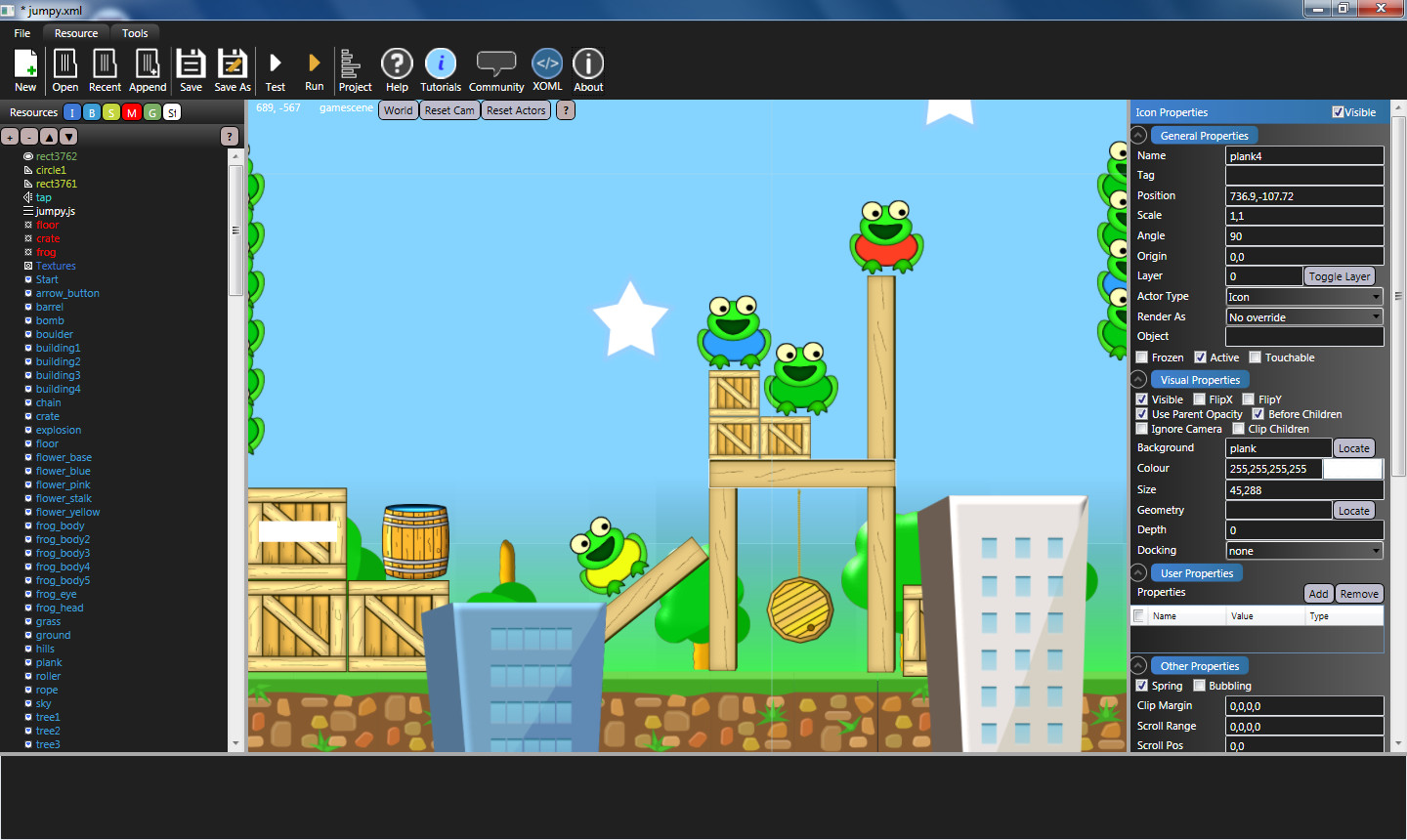
Booty5 enables you to produce HTML5 based games and apps for mobile and desktop using a WYSIWYG game editor.

Booty5 HTML5 game maker screenshot

Booty5 v1.3 the free open source HTML5 game engine now available

More happy coding evenings and weekends for me means more juicy features for you. Well, that’s a bit of a fib, the latest version 1.3 is more of a tidy up and documentation phase. I’ve spent a few hours each evening this week putting together the Booty5 introduction and the Booty5 API reference and along the way I ended up tidying up the source code. By the way, did I mention that the minified version of Booty5 without Box2D functionality is only 50k!

v1.3 changes:

  • Added more comments
  • Actor setters now only dirty transform if a change is made
  • Actor.findActorDeep() removed
  • Actor.findActor() has additional parameter that allows recursive searching
  • Actor.sendToBack() added
  • Actor.addFixture() now returns the created fixture
  • Actor.addJoint() now returns the created joint
  • Scenes now active property which can be used to pause processing
  • Scenes will now still be processed when not visible
  • Scene.findActorDeep() removed
  • Scene.findActor() has additional parameter that allows recursive searching
  • Scene.sendToBack() added

I’m hoping to have full support for Booty5 in the up and coming next beta release of the Goji Editor, so watch this space.

Booty5 the free open source HTML5 game engine has big update

That’s right, I’ve been busy coding away like a mad man to bring you a huge update to Booty5 the free open source HTML5 game engine which is available for download on Github.

Changes include:

v1.2 Changes:
* GSAP dependency removed
* JQuery dependency removed
* Support for actor hierarchies added
* Support for physics joints added to actors
* Opacity for actors and scenes added
* Actors now support 3D depth property
* Actors now have support for onCreate and onDestroy event handlers
* Actors now support box, circle and polygon shaped fixtures
* Fixtures can now be marked as sensors
* Actors and Scenes can now clip their children against box, circle and polygon clipping shapes
* Actors and Scenes now have separate active and visible states
* Actors now have a simple physics system that is used on Actors that are not under control of Box2D
* Actors can be docked to the edged of the display as well as to the edges of canvas actors
* Actors can now ignore scene camera movement
* Actors now support onCollisionStart and onCollisionEnd events
* Child actors can now bubble events up to parents
* Scene camera can track actors
* Scenes now support touch panning
* New actor types added:
* ArcActor – Displays arcs / circles
* CanvasActor – A UI actor that can arrange, scroll around and dock its content
* ParticleActor – An actor that is a particle system
* Polygon Actor – An actor that displays polygon shapes
* RedctActor – An actor that displays rectangle shapes
* Support for timeline key frame based tween animations added
* Support for various types of resources added on a global or scene local level, including:
* Shapes – Used by clipping and physics systems
* Geometries – Used by rendering system to render geometries
* Brushes – Used to create sprite atlases / bitmap animation
* Sounds – used to play back audio
* Materials – Used to define physics materials
* Full support for the Goji Editor added, including XOML loader

I’ve also started documenting the engine and API at http://www.gojieditor.com/index.php/booty5

Booty5 – Free HTML5 Game Engine

I’ve finally branched out into HTML5 game development, I’ve been avoiding it for years but finally took the plunge. Funnily enough my first creation with HTML5 is the Free Games Bandit, a service to help game developers get their mobile games noticed. I found myself actually enjoying working with JavaScript, CSS and HTML5. I’ve changed my whole mindset regarding HTML5, where I once saw it as a tool for creating gimmicky web site widgets I now see it as a valid way to make games and proper slick interactive web sites.

With the previous paragraph in mind I have begun the long journey of creating an HTML5 game engine, which I have randomly named Booty5 and is hosted on Github. I’ve already made some headway putting together the basics of scene / actor management, support for sprite atlases / sprite animation, Box2D physics and animation via GSAP etc..

My plans for the engine in the future are to support a majority of features from the AppEasy Core SDK. I am also in the process of extending the Goji Editor to enable support for building, testing and deployment of HTML5 games.

You can find out more about the free game engine here

HTML 5 Gotchas

On this page I will place all of the gotchas that I come across during my HTML 5 developments.

IndexSizeError: Index or size is negative or greater than the allowed amount

I got this error Firefox and a similar error in Internet Explorer whilst drawing an image to the HTML 5 canvas using drawImage(). The problem turned out to be trying to draw a portion of an image that was outside its bounds. I was drawing what I thought was an 800×600 image, which was actually 798×600 so the source rectangular area that I was drawing was off the edge of the actual image. Doh!

HTML5 cheat sheet

This page is basically a dumping ground for all the useful bits of info that relates to HTML5 development.

Useful HTML5 semantic elements

    <article> – Defines an article in the document
    <aside> – Defines content aside from the other page content
    <footer> – Defines the footer for a section in the document
    <header> – Defines the header for a section in the document
    <nav> – Contains page navigation links
    <section> – Defines a section in a document

HTML 5 Journey Part 1 – What is HTML 5 tutorial

I’ve always liked web development (from a gaming perspective), but not to the same extent as I have good old solid native development with C++. The main reason being “JavaScript”. To be honest, I did JavaScript years and years ago and it terrified me, I couldn’t get used to not having pointers and variables that have a set type amongst other things. The main problem however for me has always been speed, if I want to make a game I want to provide a good interactive experience without loads of lag, slow frame rates and dodgy access to things like audio playback and input. So, for years I avoided client side JavaScript and the DOM and went with Java Applets, which seemed great, nice and quick, good frame rates, can render 2D and 3D, access to I/O etc.., but if I remember correctly there were browser security issues, oh and it crashed (or refused to load) across different browser versions. After a while mucking around with applets I went to Microsoft Silverlight, followed it for a few years, made some nice things with it but then Microsoft dropped support for it in favour of HTML 5! (How can I ever forgive you Microsoft!) Now everyone and their grand mothers seem to be bending over backwards to support HTML5, so I feel like its time to finally take a good look at this newish technology and see what I can do with it.

This blog series is going to cover my noobish attempts to learn how to use HTML5 / JavaSctipt with possibly a little PHP back-end junk thrown in. At the end o the blog series I will probably revisit the series and tidy up so I can mislead as few developers as possible!

Right waffle over, on with something useful.

What is HTML5

Well, I’ve purchased various HTML5 books and started to read them, missing my C++ and the Marmalade SDK already. I’ve come to the conclusion that HTML5 is a bunch of things:

  • Well it uses HTML5 mark-up to begin with, but some new cool tags have been added to provide access to stuff like a drawing canvas and video playback
  • Cascading style sheets (CSS3), this is a language that you use to add style to the various HTML page elements
  • JavaScript, this is the language used to manipulate the HTML of the page and what not

How do I create an HTML 5 page?

Simple, create a text file using any old text editor (I use Notepad++ as it has syntax highlighting for HTML, CSS and JavaScript) and called it something,html. You can open this file in a browser to view the page which as Mrs Brown says is nice.

Here’s an example HTML5 page that does absolutely nothing useful:

[sourcecode language=”html”]
<!DOCTYPE html>
<html>
<head>
<meta charset="utf-8">
<title>HTML5 for absolute noobs (I appear in browser bar)</title>
</head>
<body>
<h1>HTML5 for absolute noobs header</h1>
<p>
HTML5 for absolute noobs paragraph
</p>
</body>
</html>
[/sourcecode]

What does all this junk mean? Lets take a look at it in sections.
Line 1 – This tells the browser that this is an HTML 5 document
Line 2 – The html tag tells the browser that the stuff in this section contains HTML
Line 3 – The head tag contains things like the page title, which scripts and style sheets to include
Line 4 – The meta tag describes metadata such as the character set that the document uses
Line 5 – The title tag is the title of the page, this is usually displayed in the browser title bar
Line 6 – Closes the head tag
Line 7 – The body tag contains the main body of the document, basically all of the text, images and so on
Line 8 – The h1 tag designates whatever is inside it as a level 1 header and will be styled as such, usually large and bold unless redefined with a style
Line 9 – The p tag begins a new paragraph on the page
Line 10 – Some content to display in the paragraph
Line 11 – Ends the paragraph
Line 12 – Ends the main body
Line 13 – Ends the html document

How do I add some style to my web page?

Well to begin with we will add some style to the previous example to make it look a little colourful. We will use what’s called inline styling. This is when you are too bone idle to create a style sheet and link it into your document. Lets take a look at an impossibly useless example:

[sourcecode language=”html”]
<!DOCTYPE html>
<html>
<head>
<meta charset="utf-8">
<title>HTML5 for absolute noobs (I appear in browser bar)</title>
</head>
<body>
<h1 style="color:green;">HTML5 for absolute noobs header</h1>
<p style="color:blue;">
HTML5 for absolute noobs paragraph
</p>
</body>
</html>
[/sourcecode]

if you are as observant as I then you may notice that two lines in the code have changed:
Line 8 – We have added an attribute called style then stuck some stuff into quotes. We basically tell the browser to change the colour of the text in the h1 tag to green
Line 9 – We have also added the style attribute here, but changed the text colour to blue instead

How do I style stuff using CSS instead of inline styles?

Most web developers prefer to use a style sheet to style elements of the web page, which I am guessing when my web page becomes bulky and very scarey will make it much easier for me to change the look of my web page without having to go through and change every single style that I set. A style sheet is basically a text file with the extension .css that you include in your html document. You include a style sheet like this:

[sourcecode language=”html”]
<head>
<meta charset="utf-8">
<title>HTML5 for absolute noobs (I appear in browser bar)</title>
<link rel="stylesheet" type="text/css" href="styles.css">
</head>
[/sourcecode]

Inside our header tag we have added a link to a style sheet called styles.css. When the page is loaded this style sheet will be loaded and all styles within it will be applied to elements of the page. If the style sheet does not contain styles for elements that are on the page then they will get the good old default ugly style. Lets take a look at an example style sheet:

[sourcecode language=”css”]
h1 {
color: green;
}
p {
color: blue;
}
[/sourcecode]

In the above style sheet we list the h1 tag and then place a bunch of attributes that we want to redefine along with their values separated by the colon character inside braces. The only problem with this is that it will change the colour of all h1 and p tag content that’s on the page, which is great if that’s what you want, but not so good if it isn’t.

To get around this you can name your elements and then simply define a style for the named element. Lets look at an example:

[sourcecode language=”html”]
<h1 id="header1">HTML5 for absolute noobs header</h1>
<h1>I refuse to have style!</h1>
[/sourcecode]

[sourcecode language=”css”]
#header1 {
color: blue;
}
[/sourcecode]

We have named the first h1 tag header1 using the id attribute. We can refer to this named element in the css file by placing a hash character in front of the name.

There’s a ton of other stuff that you can do with CSS from what I understand, but I’m not clever enough to go into that just yet, maybe in a later article.

How do I get some JavaScript code into my web page?

There are two ways, you can use inline JavaScript, this is code that you write directly into the html document, which can get rather messy. Theres also the much cleaner and user friendly way of including a JavaScript file into the document rather like we did with the style sheet. Lets take a look at inline JavaScript first. Run the following html:

[sourcecode language=”html”]
<!DOCTYPE html>
<html>
<head>
<meta charset="utf-8">
<title>HTML5 for absolute noobs (I appear in browser bar)</title>
</head>
<body>
<h1 id="header1">HTML5 for absolute noobs header</h1>
<p>
HTML5 for absolute noobs paragraph
</p>
<script>
document.getElementById("header1").style.color = "blue";
</script>
</body>
</html>
[/sourcecode]

At lines 12-14 we have inserted a script tag containing a single line of script. The script itself looks for an element called header1 then changes the color attribute of its style to blue.

Now lets take a look at an example where we use common sense and decide to put our code into a separate script file. Create the following two files (test.html and code.js) then open the html file in a browser:

[sourcecode language=”html”]
<!DOCTYPE html>
<html>
<head>
<meta charset="utf-8">
<title>HTML5 for absolute noobs (I appear in browser bar)</title>
</head>
<body>
<h1 id="header1">HTML5 for absolute noobs header</h1>
<p>
HTML5 for absolute noobs paragraph
</p>
<script type="text/javascript" src="code.js"></script>
</body>
</html>
[/sourcecode]

[sourcecode language=”html”]
document.getElementById("header1").style.color = "blue";
document.write("Hello World");
[/sourcecode]

At line 12 of the html file we have still got a script tag, but instead of placing our script inside the script tag, we have moved it out into its own file and included the script file into the html document.

Well, I’ve had enough for one evening, my feet ache. I stand at my desk instead of sitting because I’m into self punishment. I hope to cover something a little more interesting next time, maybe take a look at the DOM.

Oh, do I care about typos and bad spelling / grammar? No, if I did then I would have become an English teacher and not a programmer!