Developing games for mobile and desktop? Then why not go cross platform and try out the Marmalade SDK, its now free. Available in C++ and Lua flavours.
Just came across these old school demos that are done in HTML5, takes me back it does :). Well worth a mention and a look. Created using the CODEF JavaScript framework.
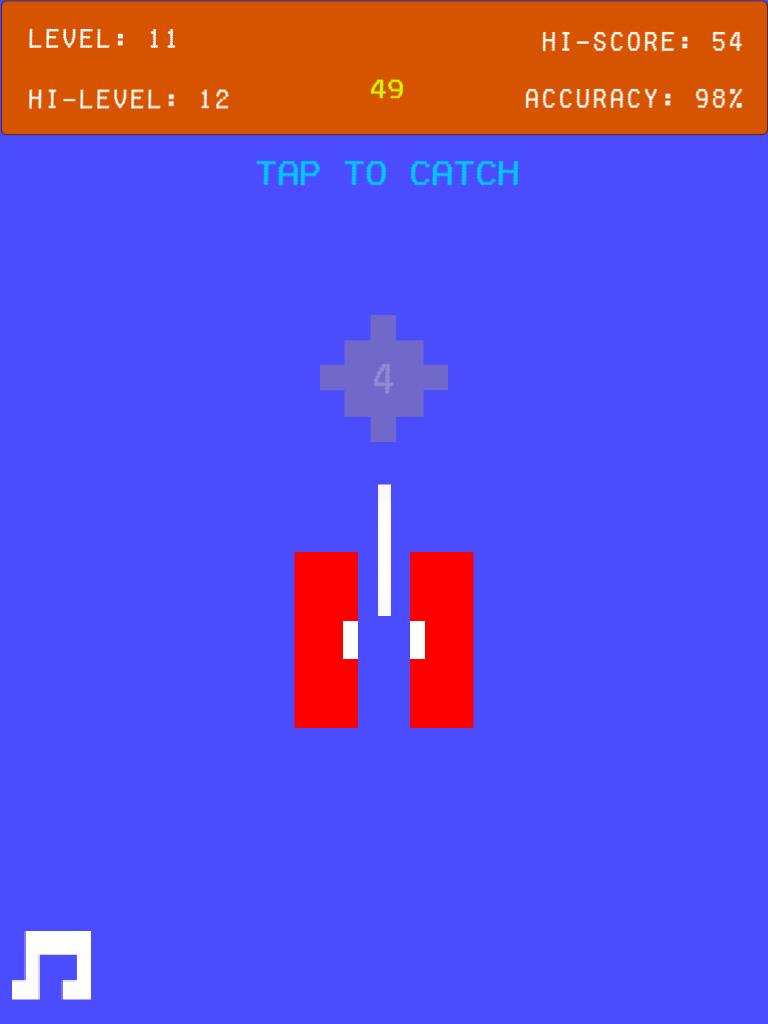
Well, I decided to take a step back (literally) in game development, back as far as the 80’s. Remember the old Atari style games? well I wanted to create something like that, so the game is pure and simply about game play. Lets take a look at a quick screenshot:
Jazzler Android Game on Google Play
Now this is how I remember games looking on the old Atari 2600, blocky graphics and vivid colours and I loved them.
Ok, so the basics of the game is that a Jazzle drops down the screen and you simply tap the screen to catch it. Each round the Jazzle moves a little faster and becomes a little shorter. The catching mechanism also becomes a little shorter, although it resets in size every 50 rounds or so. If you fail to catch a Jazzle then its Game Over and you have to start from scratch.
New backgrounds colours are unlocked as you progress, because well I love all the different colours. Also the Jazzle will taunt you, but as you progress you begin to change the Jazzlers taunts from negative to positive.
In case you’re wondering, I can get to around level 50 so far.
Jazzlers is available for both Android tablets and phones on Google Play.
There are no plans for an iOS version yet, because iOS free games are pretty much dead without a big old marketing budget, maybe after Christmas, who knows.
Calling all content developers, the newly opened Marmalade Asset Store have an opening offer. Register as a seller now and earn an 80% revenue until the end of 2015 (usual revenue share is 70%).
From 2D / 3D art assets such as backgrounds, textures, sprites, animations, meshes and high quality sound effects, to project files and templates, plus any great integrations you’ve developed and would like to sell or share: all are welcome in the Asset Store.
Looks like Marmalade have been busy beavers working on their latest release of the Marmalade SDK. There are a lot of changes, but I’m just going to focus on the highlights:
New Marmalade Hub
The Marmalade Hub has had a complete revamp. Its got a new look and feel and now feels like a proper integrated Hub including features such as:
Open, create and build projects for all platforms. Creation of new projects also includes a very handy and easy to use integrations section ghat allows you to easily add integrations such as analytics, game services etc.. very easily and intuitively. The project templates are also very handy, especially for new developers.
Handy recent projects and examples lists
Multiple projects can now be opened simultaneously and access to home is always available without backing out of a project
Centralised and direct access to asset store, documentation, community answers, blog and tools (one of my favourite new additions)
Platform settings are now better categorised and more easily accessible
Project libraries list which shows a list of all libraries used by the project
Proper import of different deployment configurations
Update from MKB feature
All in all, the new Hub is a massive improvement.
Marmalade Analytics
Marmalade Analytics for C++ and Lua, is a great new addition for developers that really want to drill down into the behaviour of their game players to help increase user retention and hopefully increase monetisation. Marmalade Analytics is powered by industry leader GameAnalytics. Marmalade Analytics is incredibly easy to use out of the box as can be seen in this IwAnalytics example.
Android Native Debugging
I’ve been waiting for this feature for a bit, its been in beta for a while, but its now officially released. To debug an Android app in Visual Studio simply open it in the hub then click the “Open in IDE for debugging” button. Note that the first time you do this Visual Studio 2015 will prompt you to install Android support for C++, go ahead and install that (this may take a while so go for a coffee or take a nap :)).. Once your app has launched in visual studio click the green start triangle to start debugging.
Asset Store
Marmalade now have their very own asset store, which includes all kinds of assets from audio and bitmaps to extensions and full game engines. Submitting assets to the store is very simple, take a look here for details.
That’s right, you can now debug Android games on apps using Visual Studio on Android, which is awesome of course.
You can download the Marmalade SDK for free from the Marmalade SDK website
Ok, now that I’ve finally contained my excitement (no more trailing through adb output!), here’s the full list of changes:
Changed since 7.9
Marmalade Hub
MSDK-1516 Fixed an issue on Windows that prevented newer versions of iTunes from being detected by the Dependency Checker.
Marmalade Quick
MSDK-1582 Networking library for Marmalade Quick updated with IPv6 support.
MSDK-1620 Render Texture example improved to show more efficient usage of sprites.
MSDK-1476 Fixed an issue when deploying from the command line that could cause app binaries to fail to be located.
Middleware
IwGx (MSDK-1524) Fixed an issue with CIwTexture::LoadFromFile() where alpha was incorrectly converted for 32-bit images.
IwCRT (MSDK-1610) Implemented getaddrinfo() and freeaddrinfo() functions.
IwTwitter (MSDK-942) Fixed an unknown error during socket connection that prevented a session from being established.
Platform Abstraction
s3eSocket (MSDK-1603) Fixed an issue on iOS where no connection would be reported when connected via an indirect network connection type (ad-hoc networks or IPv6 tunnels). You can restore the previous behaviour if required by setting IOSUnreachableIndirect to 1 in your app’s ICF.
iOS
MSDK-1471 Fixed an issue that could cause touch callbacks to be lost when playing video.
MSDK-1281 Fixed an issue that prevented correct resizing of video when device orientation was changed.
Android
Beta support for Android Native Debug mode, allowing you to use the Visual Studio Debugger or GDB to debug your Marmalade apps on Android devices.
Google Native Client
MSDK-1584 Fixed an issue that could cause a black screen on startup.
Examples
IwHTTPExample (MSDK-1574) Example now fails gracefully rather than crashing when unable to connect to an IPv6 address on 64-bit Android devices.
Do you love to make games? Are you passionate about making games? Do you want to find other developers just like yourself? Well, I recently came across a new social community and resource for developers of all professional skill levels. You can join a community of independent game developers and find a collaborator, a team, a project, or just a new friend. Well what are you waiting for, see you over at IndieDeveloper, If you want to friend me, I’m user mrmop,.
Support for the Web Audio API has been added offering better control over audio playback. Using it is s simple case of ticking support for it in the projects properties (on by default).
Full list of changes include:
Game Editor v1.9.2b:
Added new use web audio export option to project settings
Added new auto play property to sounds which cause sound to automatically start playing once loaded
Added new export option force_round which will force all exported actors to use pixel rounding
Fix: Project property smoothing is now applied in exported code
Fix: Canvas centering on some mobile devices
Game Engine v1.4.8 and 1.4.9:
b5.Xoml.loadJSON now accepts 4th parameter which can be used to stipulate loaded data should be returned as binary buffer
b5.App.use_web_audio property added which can be used to switch on support for Web Audio if it is supported
b5.Xoml.loadJSON moved to b5.Utils.loadJSON
b5.Xoml.loadJS moved to b5.Utils.loadJS
Added support for web audio API to sound (default is enabled). To disable Web Audio set b5.App.use_web_audio to false. If web audio is not supported then it will fallback to HTML5 Audio
b5.App constructor now accepts a second parameter which enables / disables web audio support
Added b5.Sound.auto_play property to enable auto playback of sounds after they are loaded
JSDoc documentation added
b5.App.canvas_fill_window removed
Modified how the render scaling and canvas resizing works to make it easier to use.
Booty5 the HTML5 Game Maker v1.9.1b is now available for free download.
Editor Changes:
Scale and angle are now affected in multiple actor selections
Editor export properties now supports smoothing property that will enable / disable anti-aliasing during rendering
Added support for rounding pixels to actors, if disabled then pixel coordinates will be rounded to integer values, can improve performance but at a cost of lower precision rendering
Removed some currently unused options from sprite and label
Font size and face separated in labels
Font weight added to label
Editor now shows text preview
Exported collision flags are now used by engine
Added vertices snap to shape editor
Added new Collision Flags example
Fix: Convex shapes were not exporting correctly
Fix: Some properties such as actor scale were not exporting correctly with an export precision of 0
Engine Changes:
Added new property to Actor called round_pixels, when set to true vertices will be rounded to integer which can speed up rendering significantly
Added support for collision flags to physics fixtures (category, mask and group index)