Yet another IwGame Engine UI Progress Update

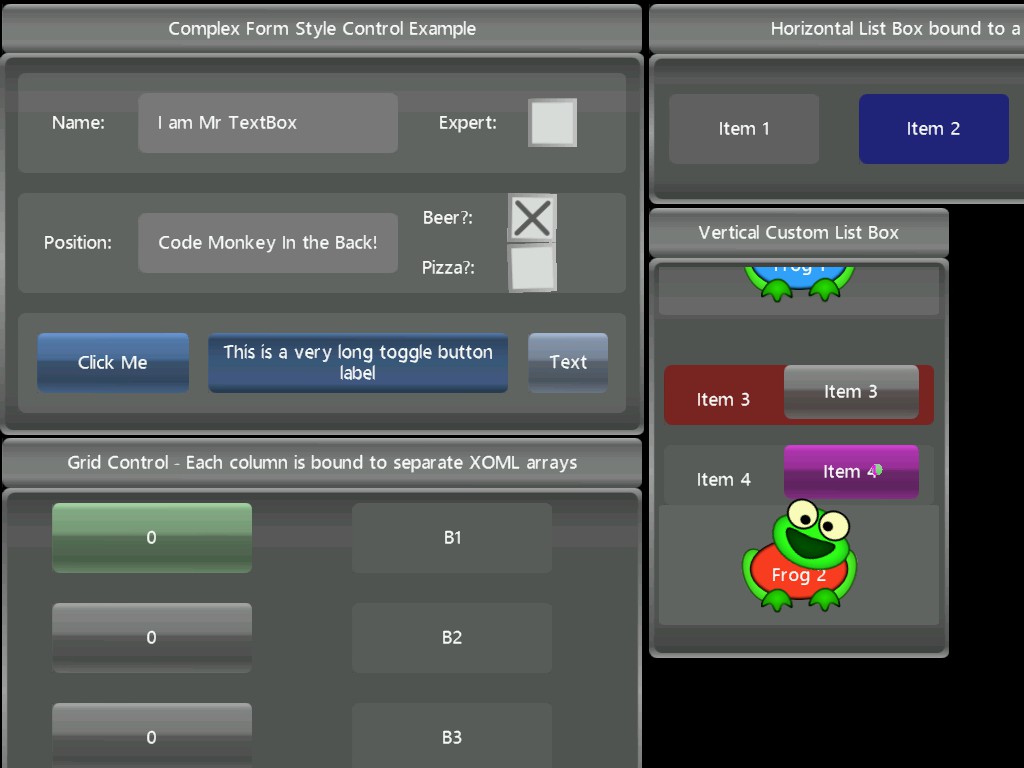
Not had a great deal of spare time to spend on the UI this week but did manage to get a few cool things in there including:

  • Scrolling grids
  • Scrolling list boxes
  • Horizontal list boxes
  • 9-patch brushes
  • Child element sizing based on percentage of parent
  • Child clipping
  • Grid per column bindings
  • Dynamic resizing of elements, grids and list boxes will automatically re-layout child elements to make use of extra space
  • UI elements can allow touch events to bubble up to parent elements allowing them to also receive the same events
  • Tidied up the UI input system
  • 4 parameter skewing – See the wonky text on the large and small buttons for an example

Heres a quick screen shot showing the current UI demo:

More Advanced IwGame Engine UI Screen Shot

Those frogs look happy to be sat in that list box like that 🙂

And here’s a new and better video showing the new UI http://www.youtube.com/watch?v=IhtT_e5u8gU

I hope to spend a few additional weeks on implementing more UI controls such as sliders and tab vies etc.. before we released 0.35.

Luck Bubbles – Why some are luckier than others

Last year I was sat in the garden on the swing in the blazing son, relaxing and thinking up nonsense. I happened to think  back to a chat I had with my father some years before where he said that “if there was no bad luck in the Universe then he would have no luck at all”, I found the comment quite amusing at the time. However, years later after suffering at the hands of rotten luck for a while it got me to thinking about why some are lucky and some are not.

My mind is a strange one and loves a thinking challenge, so it began running through hundreds of possible theories. One theory I quite liked was the “Luck Bubbles” theory (not an official theory as far as I know). In this theory, Luck Bubbles are basically areas of luck that exist in 4-dimensional space-time. They float around and are attracted to positive thoughts / energies. If an area at a specific time has a particularly strong attraction then Luck Bubbles will congregate there for a while.

Luck Bubbles change the nature of positive chance events in the area that they cover, being stronger towards their centre and tapering off towards the edges. Conversely bad luck bubbles also exist in this theory which have the exact opposite affect of good luck bubbles tending to congregate around negative energies / thoughts.

So maybe luck is a state of mind? Positive thoughts could lead to better luck. Next time you put the lottery on or release a new app, think positive just in case.

Well, I’m off to travel the globe tossing a coin to test my theory 😀

IwGame UI Progress Update

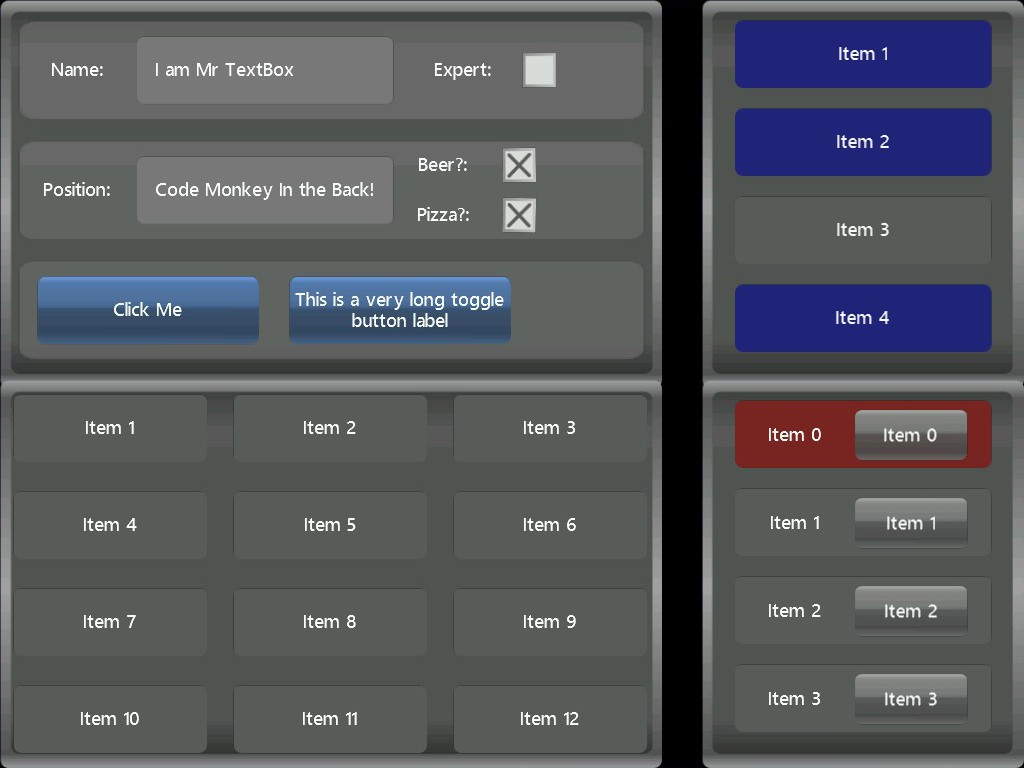
Got a quick update showing how the IwGame engines UI system is shaping up. Note that the UI system is “bitmap” based and IwGame does not draw things like buttons, grids etc.. manually. Here’s a quick screen shot at iPad resolution showing some basic UI:

Basic IwGame Engine UI Screenshot

This is just a static image however, so you cannot really see the animation that’s built into the UI, for that you need to take a look at a quick video I stuck together showing the UI in action at http://www.youtube.com/watch?v=oV3kYLbzcKo


The UI itself consists of the following elements:

  •  StackPanels – The top left hand control is a vertical stack panel containing 3 horizontal stack panels. Each horizontal stack panel contains multiple basic UI components including buttons, labels and text input boxes. The check boxes and the long named button are toggle buttons. The top stack panel and the components within the panel have been draggable so they can be dragged away from the stack panel and moved around. Tapping the Expert check box will spin the control 360 degrees using an animation time line. One of the buttons and two of the check boxes also have animation time lines applied to them.
  • Grid – The control to the bottom left is a 3×4 grid that contains 12 items. These items are simple label buttons that when tapped will animate. A XOML array variable is bound to the grid and data from the array is moved into the grid. Updating the XOML array will automatically update the grid elements. The types of elements within the grid are defined using an item template. You can create a grid manually by adding components directly to the grid in XOML or in code bypassing the binding system. This allows you to create more complex controls within each grid cell. Tapping an item in the grid will set it animating
  • List box – The list box to the top right work on the same principles as the grid where data is bound to the list box and a template can be specified that defnies the type of items. This list box is a multi-select list box which allows you to select multiple  items
  • List Box 2 – The list box to the bottom right is more complex list box that shows list items using a more complex control. The list box items in this instance are created using a horizontal stack panel, which contains a label and a button. The list box is a single item selection list box

The UI controls themselves can be moved around and placed anywhere in the scene. the whole scene can also be moved around.

To give you an idea as to how the XOML looks, here’s a short code clip showing the XOL that creates the list box to the upper right of the screen:

    <!-- Create a listbox --> 
    <!-- ListBoxItems - Defines a list of items that will be bound to the list box -->
    <Variable Name="ListBoxItems" Type="arraystring" Size="4" Value="Item 1, Item 2, Item 3, Item 4" />
    <!-- Create a template that will be used to generate the list box actors -->
    <Template Name="ListBoxItemTemp">
        <Label Name="ListItem$index$" Background="ListBoxItemBrush" BackgroundColour="200, 200, 200, 255" SelectedColour="80, 80, 255, 255" Font="trebuchet_12" TextColour="255, 255, 255, 255" SelectedTextColour="255, 255, 255, 255" Margin="0, 0, 20, 0" SelectType="toggle" Selected="false" />
    </Template>
    <ListBox Name="ListBox" Position="351, -190" Background="ListBoxBrush" MultiSelect="true" ItemsData="ListBoxItems" ItemsTargetType="text" ItemsTemplate="ListBoxItemTemp" HitTest="true" Draggable="true" />


As you can see its pretty straight forward:

  • We create an array string variable and assign it the data that will be bound to the list box
  • We create a template that represents our items
  • We create a list box that uses the template and data and make it draggable

Well that’s it for now. We will be adding more and more features to the UI over the coming weeks and will keep you updated.


Pocketeers Limited is taking on New Mobile Projects


Pocketeers Limited Mobile Developer Logo
Pocketeers Limited Mobile Developer


Need a mobile game or app developed across multiple platforms (iPhone, iPad, Andriod,Bada, PlayBook etc..) at little extra cost? Or maybe you need a rapid prototype of your next game or app idea creating as proof of concept?

Pocketeers Limited a UK based mobile app and game developer (established in 2002) responsible for the creation of the IwGame Engine are looking to take on additional gaming and app projects. Pocketeers will consider any size project, but will favour those projects that utilise the IwGame engine / Marmalade SDK. Pocketeers have worked with clients large and small including the likes of Electronic Arts, Destination Software, Ideaworks, Honey Badger Studios, Tournay Software, and others.  Pocketeers provide a full range of services including design, coding, art work, audio and testing at very competitive prices.

For more details you can contact Pocketeers Limited via the web at http://www.pocketeers.co.uk/?page_id=8

Marmalade Job Post – Playalla Need Word Game Developer

Hi Everyone,

Another job posting has come across my desk recently so here it is. A new start-up called Playalla is seeking a  C/C++ Marmalade SDK developer for a short term contract (around 3 months) to help them finish their word games. Playalla already have a prototype of their game up and running based on match-3 game play. Ideally they are looking for a developer that has previous experience with creating word games. The work can be carried out remotely so is ideal for a freelance game developer.

If you are interested then please send a few details about yuorself, your experience (games released etc..) to Wissam at wissamharoun@hotmail.com

Mat

Marmalade Job Post – BeInToo Need A Developer

Hi Everyone.

The guys over at http://www.beintoo.com/ that developed the awesome BeInToo gamification and rewarding technology are looking for a capable Marmalade SDK developer that can use the EDK to bring their SDK over to Marmalade. If you know your way around the EDK and know enough about the Android / iPhone SDK’s then you should probably get in touch.

The work can be carried out remotely and does not have to be done on-site which is great for freelance developers.

You can take a quick look at the RESTful API to see what the SDK is all about http://documentation.beintoo.com/

Good luck

Mat


Game Engines Review

I came across a cool web sit the other day that shows many of the different game engine solutions for mobile platforms at http://mobilegameengines.com. The list itself is very comprehensive and includes information relating to the engines as well as reviews from actual engine users.

If you have a spare 5-10 mins please consider leaving a review for the IwGame Engine at http://mobilegameengines.com/iphone/engines/40-iwgame-engine

And possibly also a review for the Marmalade SDK at http://mobilegameengines.com/iphone/engines/11-marmalade

A BIG thank you to anyone that gets the time to leave a review

Puzzle Friends FREE for iOS Just Released

IwGame powered Puzzle Friends has just been released on iPhone, iPad and iPod Touch. This product shows many of the latest IwGame features running in a commercial product on iOS, including in-app purchasing, Facebook posting and dynamic content. It also includes Scoreloop leaderboards which will be integrated into IwGame soon as an extension.

http://itunes.apple.com/us/app/puzzle-friends/id513683800?ls=1&mt=8

Its FREE so grab a copy now and check it out. Please consider leaving a nice review if you like the game 🙂


IwGame Engine Update – XML Schema for XOML Now Available

Ok, so we’ve heard back from a few of you and its apparent that XOML can be a little difficult to work with especially as it had no intellisense to help create well formed XOML. In the interests of making XOML much easier to write we have created an XML Schema that you can use to validate your XOML and provide intellisense support. Please note that the schema has only been tested in Visual Studio 2010. If you have problems with it in any other IDE then please let us know.

The XML Schema for XOML can be downloaded from http://www.drmop.com/XOML.xsd

Updated versions of the Schema will also be included with the IwGame Engine from v0.35 onwards

To use the Schema in Visual Studio 2010, open your XOML file, right click somewhere on the page and select properties then go to the properties windows. Click in the Schemas box then click the small file selector to the right (this will open up all of the available XML schemas). If XOML.xsd is not already in the list then click the Add button which pops up the file select dialog. Select XOML.xsd and open it, this will place it in the XML schemas list. Now click in the Use column next to XOML.xsd and select “Use this schema” then click OK. Your document should now be validated against the XOML schema and you should have intellisense / auto-complete etc..

Note that there are a few restrictions, for example, the schema does not include support for custom actor / scene names or support for FromTemplate parameters. if you are XSD savvy enough to figure out how to add that support then please let us know (I personally have only spent one day working with XSD which was today so I’m still a little wet behind the ears). For the meantime, you may want to edit the XOML.xsd schema file and add them yourself. A quick and easy way to get the schema to recognise your custom named scenes is to edit XOML.xsd, go to the bottom of the file and you will see a group called TopLevel. Copy and paste the line that defines Scene and change the word Scene to the name of your own scene class, e.g:

<xs:element name=”Scene” type=”SceneType” />

<xs:element name=”MenuScene” type=”SceneType” />

To add a custom actor create a copy the ActorImage tag and rename the copy to your custom class name, e.g.:

<xs:element name=”ActorImage” type=”ActorImageType” />

<xs:element name=”FrogActor” type=”ActorImageType” />

For actors, you will also need to copy the same line to the ActorGroup (situated just below the TopLevel group)

Please note that this will not take into account your own custom parameters, for that you will need to add your own complex types and attributes to handle it.

Lastly, to add custom actions, go to the top of XOML.xsd to the ActionsEnum type and copy one of the existing actions, paste and replace your own action name, e.g:

<xs:enumeration value=”CustomAction1″ />

Well that’s it, hope the schema helps to make XOML more usable. Please let us know if you have any problems (don’t send me complex schema questions because I don’t have a clue :))


IwGame Engine v0.34 Released – Modifiers, Box2D Joints and Marmalade 6.0 fix

New here? What’s IwGame? IwGame is an open source free to use cross platform game engine for iPhone, iPad, Android, Bada, Playbook, Symbian, Windows Mobile, LG-TV, Windows and Mac, built on top of the Marmalade SDK. You can find out more and download the SDK from our IwGame Engine page.

Well this release is a little earlier I’m afraid, we wanted to get UI functionality into 0.34, but 0.33 had a compile issue with the recent Marmalade 6.0 release so we decided to do a release now.

Below is the list of changes for IwGame 0.34:

  • Fixed Marmalade 6.0 compile error
  • JPEG loading support has been removed as this is now supported by Marmalade image classes
  • New extensions system added (pass true for enable_extensions in IwGame::Init() to enable, enabled by default) – Extensions are none standard IwGame code that will be added over the coming months to support game specific features
  • Actions now have a 4th parameter
  • New modifier system added that allows you to add functionality units to actors and scene. This enables a build from blocks style development
  • New AddModifier action that can be used to add a modifier to an actor or scene and modifier its behaviour in real-time
  • New ChangeModifier action that can be used to change the active state or remove a modifier from an actor or scene
  • Actors can now be marked as draggable. A draggable actor can be moved aruond by the user using their finger
  • New SetProperty action added for actors. You can now directly change the properties of an actor using actions. Can also be used to add torque and force onto actors under control of the physics system
  • New AddProperty action added for actors. This action can be used to add a value onto the peoperties of an actor
  • IwGame now supports brushes in code and in XOML. Brushes can be created and attached to actors saving you from having to specify image and SrcRect for each actor. This enables actor styling across any actors
  • CIwGameActorImage can now be instantiated from XOML using the ActorImage tag
  • New XOML atlas inner tag added to animations to allow auto generation of sprite atlas frames
  • Support has been added for joints (distance, revolute, prismatic, pulley and wheel joints are supported in code and in XOML)
  • A scenes physics update can now be changed between constant time step and variable
  • Box2D materials now support bullet, fixed rotation and gravity scaling parameters
  • Checks for duplicates added to resources, variables, actions, modifiers, class creators
  • New CIwGameActorConnector extension actor added – This actor will size and orientate itself so that it connects two static / dynamic points in space (can target moving actors)
  • New CIwGameModFollowHeading modifier extension added – When added to an existing actor the actor can be controlled using headnig and speed instead of velocity
  • CIwGameImage::CreatePNG() now supports RGBA_8888
  • Two basic Hello World examples added, one that displays text in code and another that uses XOML
  • BUG FIX: IwGameBox2d now coompiles on Mac without error
  • BUG FIX: CIwGameBox2dBody::setFixture() now behaves as expected
  • BUG FIX: Collision flags are now restored when turning an object from none collidable to collidable
  • BUG FIX: Memory leak in CIwGameActorImage::SetSrcDest(), SetSrcRect() and SetDestSize()
  • BUG FIX: Fixed problem with html parsing in CIwGameAds::ExtractLinkAndImageFromtHTML()
  • BUG FIX: CIwGameImage::CreatePNG() crash bug fixed

Lots of changes and a few bug fixes for good measure. The most interesting changes include Box2D physics joints (been playing with them all week and they are awesome), the new modifiers system, draggable actors and the ability to set actor properties directly using actions. Lets look at some of these new changes in more detail:

Box2D Joints Support

Physics joints enable you to connect physical bodies together in a variety of ways. The following types of physical joints are currently supported:

  • Distance – A distance joint limits the distance of two bodies and attempts to keep them the same distance apart, damping can also be applied
  • Revolute – A revolute joint forces two bodies to share a common anchor point. It has a single degree of freedom and the angle between the two bodies can be limited. In addition a motor can also be applied to the joint
  • Prismatic – A prismatic joint limits movement between the two bodies by translation (rotation is prevented). The translational distance between the two joints can be limited. In addition a motor can also be applied to the joint
  • Pulley Joint – A pulley joint can be used to create a pulley system between two bodies so that when one body rises the other will fall.
  • Wheel Joint – A wheel joint restricts one body to the line on another body and can be used to create suspension springs. A motor can also be applied to the joint

All joints share the same base class IIwGameBox2dJoint

Joints can be created in code and attached to a body using CiwGameBox2dBody::addJoint(). Joints can later be removed using removeJoint(). You can also search for existing joints using getJoint() and findJoint()

        <ActorImage Name="Crate1" ...... />
        <ActorImage Name="Crate2" ...... >
            <Joints>
                <Joint type="distance" ActorB="Crate1" OffsetA="0, 50" OffsetB="0, -50" Frequency="10" Damping="0" SelfCollide="true" />
            </Joints>
        </ActorImage>

The easiest way to create and attach joints is using XOML. Below is an example showing how to create and attach a distance joint between two crates:

Actor and Scene Modifiers

IwGame supports modifiers using the IwGameModfier system. Modifiers can be thought of as small functional building blocks that can be stacked in an actor or scene to extend the functionality of that actor or scene. For example, a typical modifier for a scene could be one that tracks the players scores / hi-scores, change day / night settings or detects special gestures. An actor modifier example could be a modifier that allows the actor move around using heading and speed or even a modifier with functionality specific to your game such as make a baddy that walks left and right on a platform. The idea is to allow developers to build games and apps up from smaller re-usable building blocks and be able to add them using code or XOML. Below is a quick example showing how to attach a modifiers list to an actor in XOML:

     <ActorImage Name="Baddy1" ....... >
          <Modifiers>
              <Modifier Name="AddThrustMod" Active="true" Param1="1" />
              <Modifier Name="ShootPlayerWhenClose" Active="true" Param1="1" />
          </Modifiers>
     </ActorImage>

Here we have added two modifiers to the Baddy1 actor which modify its behaviour. Note that up to 4 parameters can be passed to the modifier

Modifiers can also be attached in code like this:

    // Find the modifiers creator
    IIwGameModifierCreator* creator = IW_GAME_MODS->findCreator("addthrustmod");
    if (creator != NULL)
    {
        // Create an instance of the modifier
        IIwGameModifier* mod = creator->CreateInstance();
        if (mod != NULL)
        {
            // Set up the instance
            mod->setName("addthrustmod");
            mod->setActive(true);
            mod->setParameter(0, "1");

            // Add the modifier to the actor
            actor->getModifiers()->addModifier(mod);
        }
    }

Draggable Actors

Any actor can now be set as draggable, allowing the user to tap it and drag it around the world. You can make any actor draggble in XOML by adding Draggable=”true” to its definition.

Setting / Updating Actor Properties from XOML

Its now possible to set or update actor properties directly from an action in XOML. Using the new SetProperty / AddProperty actions

Extensions System

From v0.34 of IwGame a new optional extensions system has been added. The extensions system is basically a collection of actors, scenes, actions, modifiers and other elements that are not part of the base IwGame engine. The extensions system provides support for game specific objects and other functionality that can be used to make creating specific types of games much easier. There’s not many extensions available yet but many more will be added in the future

IwGame Usage Changes

Please note the recent changes that have been applied to IwGame Usage. The new usage terms are shown below:

You are free to use IwGame in your projects in part or in whole as long as the header comments remain in-tact. Whilst you are not obliged to mention your usage of IwGame in your products it would be great and beneficial to let us know as we can publicise your product on our blog and other web sites / services (Our blog receives over 200,000 hits per month) However, if you use any part of the IwGame extensions system, which includes extension actors, extension scenes or extension modifiers then you are required to mention usage of the IwGame Engine in your product.

You may not claim the IwGame engine or its documentation as your own work or package it up and include it in any kind of middleware product without express prior written notice from an executive of Pocketeers Limited with the correct authority to grant authorisation. You may not publicly host any source code that is part of the IwGame Engine, the source will be hosted at http://www.drmop.com/index.php/iwgame-engine/

These changes apply to all versions of the IwGame Engine.

Well that’s it for this update